Search

Software Engineer's Notes

Tag

technology

Understanding the Testing Pyramid in Software Development

Learning testing pyramid

What is Software Testing and Why is it Important?

Software testing is the process of verifying that an application behaves as expected under different scenarios. It helps identify bugs, ensures that requirements are met, and improves overall software quality.

Without testing, defects can slip into production, leading to downtime, financial loss, and reduced user trust. Testing ensures reliability, maintainability, and customer satisfaction, which are critical for any successful software product.

A Brief History of Software Testing

The roots of software testing go back to the 1950s, when debugging was the main approach for identifying issues. In the 1970s and 1980s, formal testing methods and structured test cases emerged, as software systems grew more complex.

By the 1990s, unit tests, integration tests, and automated testing frameworks became more common, especially with the rise of Agile and Extreme Programming (XP). Today, testing is an integral part of the DevOps pipeline, ensuring continuous delivery of high-quality software.

What is the Testing Pyramid?
What is testing pyramid?

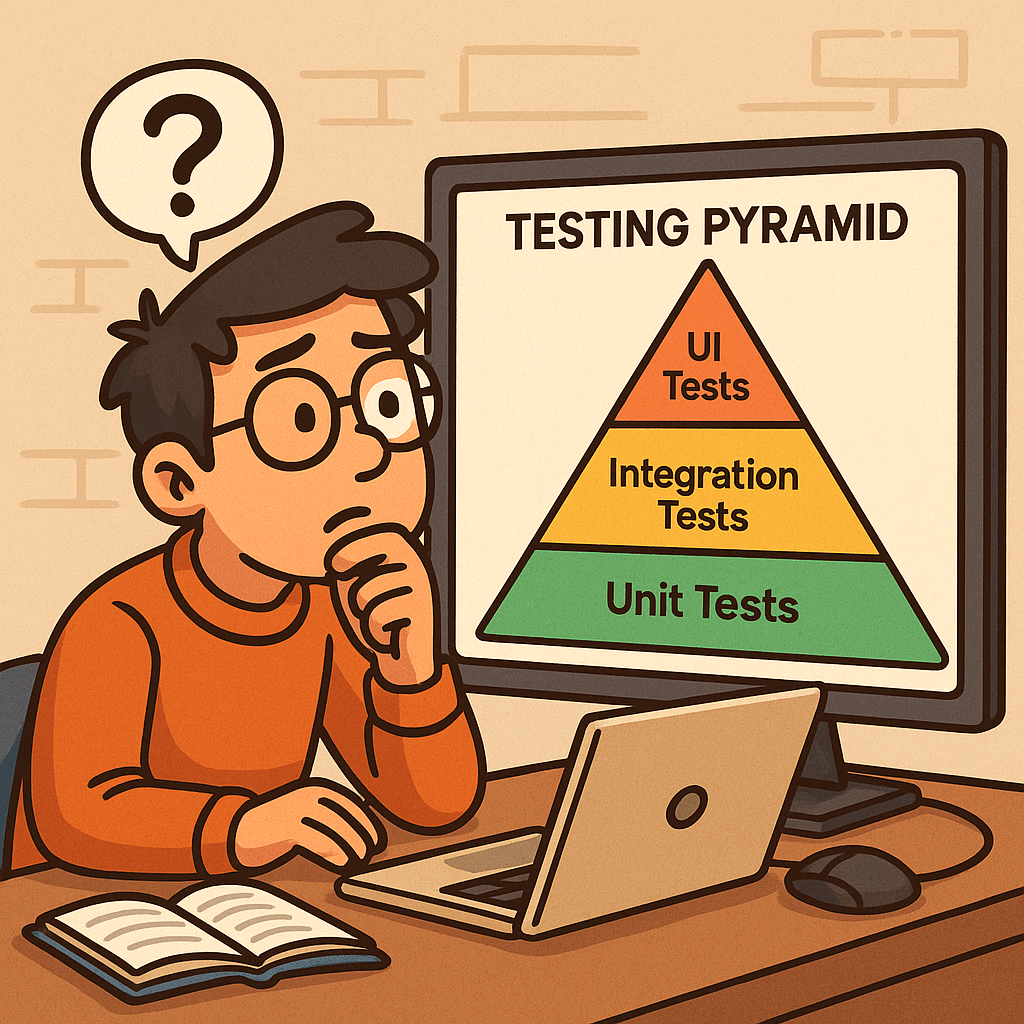
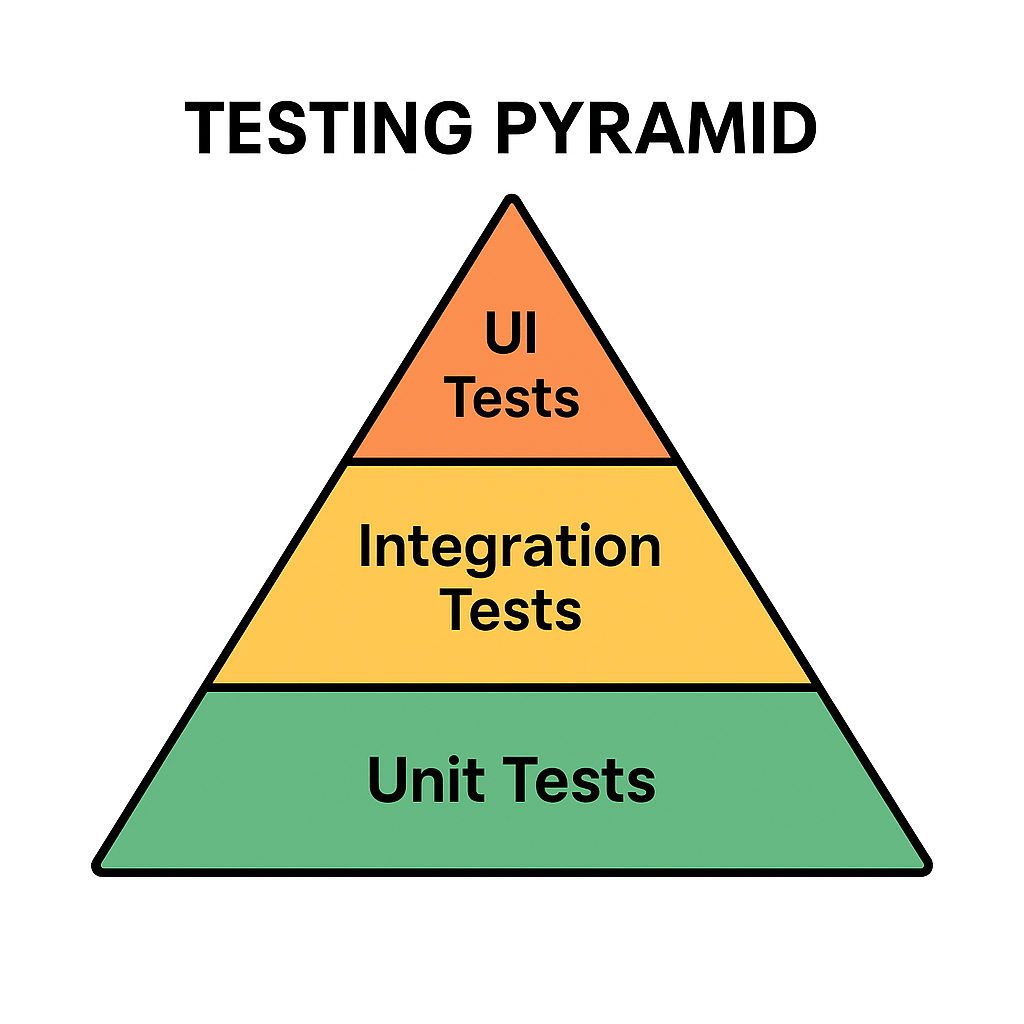
The Testing Pyramid is a concept introduced by Mike Cohn in his book Succeeding with Agile (2009). It illustrates the ideal distribution of automated tests across different levels of the software.

The pyramid has three main layers:

  • Unit Tests (Base): Small, fast tests that check individual components or functions.
  • Integration Tests (Middle): Tests that ensure multiple components work together correctly.
  • UI/End-to-End Tests (Top): High-level tests that simulate real user interactions with the system.

This structure emphasizes having many unit tests, fewer integration tests, and even fewer UI tests.

Why is the Testing Pyramid Important?

Modern applications are complex, and not all tests provide the same value. If teams rely too heavily on UI tests, testing becomes slow, brittle, and costly.

The pyramid encourages:

  • Speed: Unit tests are fast, allowing developers to catch issues early.
  • Reliability: A solid base of tests provides confidence that core logic works correctly.
  • Cost Efficiency: Fixing bugs early at the unit level is cheaper than discovering them at production.
  • Balance: Ensures that test coverage is spread across different levels without overloading any one type.

Benefits of the Testing Pyramid

Faster Feedback: Developers get immediate results from unit tests.
Reduced Costs: Bugs are caught before they cascade into bigger problems.
Better Test Coverage: A layered approach covers both individual components and overall workflows.
Maintainable Test Suite: Avoids having too many slow, brittle UI tests.
Supports Agile and DevOps: Fits seamlessly into CI/CD pipelines for continuous delivery.

Conclusion

The Testing Pyramid is more than just a model—it’s a guideline for building a scalable and maintainable test strategy. By understanding the history of software testing and adopting this layered approach, teams can ensure their applications are reliable, cost-effective, and user-friendly.

Whether you’re building a small project or a large enterprise system, applying the Testing Pyramid principles will strengthen your software delivery process.

Related Posts

Standard Operating Procedure (SOP) for Software Teams: Complete Guide + Template

Writing a SOP document for a software

A Standard Operating Procedure (SOP) is a versioned document that spells out the who, what, when, and how for a recurring task so it can be done consistently, safely, and audibly. Use SOPs for deployments, incident response, code review, releases, access management, and other repeatable work. This guide covers the essentials, gives you a ready-to-use outline, and walks you through creating your first SOP step-by-step.

What is an SOP?

A Standard Operating Procedure is a documented, approved set of instructions for performing a specific, repeatable activity. It removes ambiguity, reduces risk, and makes outcomes predictable—regardless of who is executing the task.

SOP vs Policy vs Process vs Work Instruction

  • Policy: The rule or intent (e.g., “All production changes must be reviewed.”)
  • Process: The flow of activities end-to-end (e.g., Change Management process)
  • SOP: The exact steps for one activity within the process (e.g., “Deploy Service X”)
  • Work Instruction/Runbook: Even more granular, task-level details or one-time playbooks

Why SOPs are important in software

  • Consistency & quality: Fewer “surprises” across releases and environments
  • Speed & scalability: New team members become productive faster
  • Risk reduction: Minimizes production incidents and security gaps
  • Auditability & compliance: Clear approvals, logs, and evidence trails
  • Knowledge continuity: Reduces “tribal knowledge” and single-points-of-failure

When should you create an SOP?

Create an SOP when any of these are true:

  • The task is repeated (deployments, hotfixes, on-call handoff, access requests)
  • Errors are costly (prod releases, database migrations, PII handling)
  • You need cross-team alignment (Dev, Ops, Security, QA, Support)
  • You face regulatory requirements (e.g., SOC 2/ISO 27001 evidence)
  • You’re onboarding new engineers or scaling the team
  • You just had an incident or near-miss—capture the fixed procedure

Common software SOP use-cases

  • Deployments & releases (blue/green, canary, rollback)
  • Incident response (SEV classification, roles, timelines, comms)
  • Code review & merge (branch strategy, checks, approvals)
  • Access management (least-privilege, approvals, periodic re-certs)
  • Security operations (vulnerability triage, secret rotation)
  • Data migrations & backups (restore tests, RTO/RPO validation)
  • Change management (CAB approvals, risk scoring)

Anatomy of an effective SOP (main sections)

  1. Title & ID (e.g., SOP-REL-001), Version, Dates, Owner, Approvers
  2. Purpose – Why this SOP exists
  3. Scope – Systems/teams/sites included and excluded
  4. Definitions & References – Glossary; links to policies/tools
  5. Roles & Responsibilities – RACI or simple role list
  6. Prerequisites – Access, permissions, tools, config, training
  7. Inputs & Outputs – What’s needed; what artifacts are produced
  8. Procedure (Step-by-Step) – Numbered, unambiguous steps with expected results
  9. Decision Points & Exceptions – If/then branches; when to stop/escalate
  10. Quality & Controls – Checks, gates, metrics, screenshots, evidence to capture
  11. Rollback/Recovery – How to revert safely; verification after rollback
  12. Verification & Acceptance – How success is confirmed; sign-off criteria
  13. Safety & Security Considerations – Data handling, secrets, least-privilege
  14. Communication Plan – Who to notify, channels, templates
  15. Records & Artifacts – Where logs, tickets, screenshots are stored
  16. Change History – Version table, what changed, by whom, when

A simple SOP outline you can follow

  • Title, ID, Version, Dates, Owner, Approvers
  • Purpose
  • Scope
  • Definitions & References
  • Roles & Responsibilities
  • Prerequisites
  • Procedure (numbered steps)
  • Rollback/Recovery
  • Verification & Acceptance
  • Communication Plan
  • Records & Artifacts
  • Change History

Tip: Start minimal. Add sections like Risk, KPIs, or Compliance mapping only if your team needs them.

Step-by-step: How to create a software SOP

  1. Pick a high-value, repeatable task
    Choose something painful or high-risk (e.g., production deployment).
  2. Interview doers & reviewers
    Shadow an engineer doing the task; note tools, commands, checks, and common pitfalls.
  3. Draft the outline
    Use the template below. Fill Purpose, Scope, Roles, and Prereqs first.
  4. Write the procedure as numbered steps
    Each step = one action + expected outcome. Add screenshots/CLI snippets if useful.
  5. Add guardrails
    Document pre-checks, approvals, gates (tests pass, vulnerability thresholds, etc.).
  6. Define rollback/recovery
    Make rollback scripted where possible; state verification after rollback.
  7. Clarify acceptance & evidence
    What proves success? Where are artifacts stored (ticket, pipeline, log path)?
  8. Peer review with all stakeholders
    Dev, QA, Ops/SRE, Security, Product—ensure clarity and feasibility.
  9. Pilot it live (with supervision)
    Run the SOP on a non-critical execution or during a planned release; fix gaps.
  10. Version, approve, publish
    Assign an ID, set review cadence (e.g., quarterly), store in a central, searchable place.
  11. Train & socialize
    Run a short walkthrough, record a quick demo, link from runbooks and onboarding docs.
  12. Measure & improve
    Track defects, time to complete, handoff success; update the SOP when reality changes.

Sample SOP template (Markdown)

# [SOP Title] — [SOP-ID]
**Version:** [1.0]  
**Effective Date:** [YYYY-MM-DD]  
**Owner:** [Role/Name]  
**Approvers:** [Roles/Names]  
**Review Cycle:** [Quarterly/Semi-Annual]

## 1. Purpose
[One paragraph explaining why this SOP exists and its outcome.]

## 2. Scope
**In scope:** [Systems/services/environments]  
**Out of scope:** [Anything explicitly excluded]

## 3. Definitions & References
- [Term] — [Definition]  
- References: [Links to policy, architecture, runbooks, dashboards]

## 4. Roles & Responsibilities
- Requester — [What they do]  
- Executor — [What they do]  
- Reviewer/Approver — [What they do]  
- On-call — [What they do]

## 5. Prerequisites
- Access/permissions: [Groups, accounts]  
- Tools: [CLI versions, VPN, secrets]  
- Pre-checks: [Tests green, health checks, capacity]

## 6. Inputs & Outputs
**Inputs:** [Ticket ID, branch/tag, config file]  
**Outputs:** [Release notes, change record, logs path, artifacts]

## 7. Procedure
1. [Step 1 action]. **Expected:** [Result/verification]. Evidence: [Screenshot/log/ticket comment].
2. [Step 2 action]. **Expected:** [Result/verification].
3. ...
N. [Final validation]. **Expected:** [SLIs/SLOs steady, no errors for 30 min].

## 8. Decision Points & Exceptions
- If [condition], then [action] and notify [channel/person].  
- If [threshold breached], execute rollback (Section 9).

## 9. Rollback / Recovery
1. [Rollback action or script].  
2. Validate: [Health checks, dashboards].  
3. Record: [Ticket comment, incident log].

## 10. Verification & Acceptance
- Success criteria: [Concrete metrics/checks]  
- Sign-off by: [Role/Name] within [time window]

## 11. Communication Plan
- Before: [Notify channel/template]  
- During: [Status cadence, who posts]  
- After: [Summary, recipients]

## 12. Records & Artifacts
- Ticket: [Link]  
- Pipeline run: [Link]  
- Logs: [Path/URL]  
- Evidence folder: [Link]

## 13. Safety & Security
- Data handling: [PII/PHI rules]  
- Secrets: [How managed, never in logs]  
- Access least-privilege: [Groups required]

## 14. Change History
| Version | Date       | Author     | Changes                          |
|---------|------------|------------|----------------------------------|
| 1.0     | YYYY-MM-DD | [Name]     | Initial SOP                      |

Example snippet: “Production Deployment SOP” (condensed)

  • Purpose: Safely deploy Service X to production with canary + automated rollback
  • Prereqs: CI green, security scan ≤ severity threshold, change record approved
  • Procedure (excerpt):
    1. Tag release in Git: vX.Y.Z. Expected: Pipeline starts (Link).
    2. Canary 10% traffic for 15 min. Expected: Error rate ≤ 0.2%; latency p95 ≤ baseline +10%.
    3. If metrics healthy, ramp to 50%, then 100%.
    4. Post-release verification: dashboards steady 30 min; run smoke tests.
  • Rollback: helm rollback service-x --to-revision=N; verify health; notify #prod-alerts.
  • Records: Attach pipeline run, screenshots, and smoke test results to the change ticket.

Practical tips for adoption

  • Write for 2 a.m. you: Clear, terse, step-by-step, with expected results and screenshots.
  • Make it discoverable: One URL per SOP; consistent naming; searchable IDs.
  • Automate where possible: Convert steps to scripts and CI/CD jobs; the SOP becomes the control layer.
  • Keep it living: Time-box reviews (e.g., quarterly) and update after every incident or major change.

Common mistakes to avoid

  • Vague steps with no expected outcomes
  • Missing rollback and verification criteria
  • No evidence trail for audits
  • Storing SOPs in scattered, private locations
  • Letting SOPs go stale (no review cadence)

Frequently asked questions

How long should an SOP be?
As short as possible while still safe. Use links for deep details.

Who owns an SOP?
A named role or person (e.g., Release Manager). Ownership ≠ sole executor.

Do we need SOPs if everything is automated?
Yes—SOPs define when to run automation, evidence to capture, and how to recover.

Final checklist (before you publish)

  • Purpose, Scope, Roles clear
  • Numbered steps with expected results
  • Rollback and verification defined
  • Evidence locations linked
  • Owner, Approvers, Version set
  • Review cadence scheduled

RESTful APIs: A Practical Guide for Modern Web Services

What is Restful?

What is RESTful?

REST (Representational State Transfer) is an architectural style for designing networked applications. A RESTful API exposes resources (users, orders, posts, etc.) over HTTP using standard methods (GET, POST, PUT, PATCH, DELETE). The term and principles come from Roy Fielding’s 2000 doctoral dissertation, which defined the constraints that make web-scale systems reliable, evolvable, and performant.

Core REST Principles (with Real-World Examples)

Fielding’s REST defines a set of constraints. The more you follow them, the more “RESTful” your API becomes.

  1. Client–Server Separation
    UI concerns (client) are separate from data/storage (server).
    Example: A mobile banking app (client) calls the bank’s API (server) to fetch transactions. Either side can evolve independently.
  2. Statelessness
    Each request contains all information needed; the server stores no client session state.
    Example: Authorization: Bearer <token> is sent on every request so the server doesn’t rely on sticky sessions.
  3. Cacheability
    Responses declare whether they can be cached to improve performance and scalability.
    Example: Product catalog responses include Cache-Control: public, max-age=300 so CDNs can serve them for 5 minutes.
  4. Uniform Interface
    A consistent way to interact with resources: predictable URLs, standard methods, media types, and self-descriptive messages.
    Example:
    • Resource identification via URL: /api/v1/orders/12345
    • Standard methods: GET /orders/12345 (read), DELETE /orders/12345 (remove)
    • Media types: Content-Type: application/json
    • HATEOAS (optional): response includes links to related actions:
{
  "id": 12345,
  "status": "shipped",
  "_links": {
    "self": {"href": "/api/v1/orders/12345"},
    "track": {"href": "/api/v1/orders/12345/tracking"}
  }
}

  1. Layered System
    Clients don’t know if they’re talking to the origin server, a reverse proxy, or a CDN.
    Example: Your API sits behind an API gateway (rate limiting, auth) and a CDN (caching), yet clients use the same URL.
  2. Code on Demand (Optional)
    Servers may return executable code to extend client functionality.
    Example: A web client downloads JavaScript that knows how to render a new widget.

Expected Call & Response Features

  • Resource-oriented URLs
    • Collections: /api/v1/users
    • Single resource: /api/v1/users/42
  • HTTP methods: GET (safe), POST (create), PUT (replace, idempotent), PATCH (partial update), DELETE (idempotent)
  • HTTP status codes (see below)
  • Headers: Content-Type, Accept, Authorization, Cache-Control, ETag, Location
  • Bodies: JSON by default; XML/CSV allowed via Accept
  • Idempotency: PUT and DELETE should be idempotent; POST is typically not; PATCH may or may not be, depending on design
  • Pagination & Filtering: GET /orders?status=shipped&page=2&limit=20
  • Versioning: /api/v1/... or header-based (Accept: application/vnd.example.v1+json)
  • Error format (consistent, machine-readable):
{
  "error": "validation_error",
  "message": "Email is invalid",
  "details": {"email": "must be a valid address"},
  "traceId": "b1d2-..."
}

Common HTTP Status & Response Codes

  • 200 OK – Successful GET/PUT/PATCH/DELETE
  • 201 Created – Successful POST that created a resource (include Location header)
  • 202 Accepted – Request accepted for async processing (e.g., background job)
  • 204 No Content – Successful action with no response body (e.g., DELETE)
  • 304 Not Modified – Client can use cached version (with ETag)
  • 400 Bad Request – Malformed input
  • 401 Unauthorized – Missing/invalid credentials
  • 403 Forbidden – Authenticated but not allowed
  • 404 Not Found – Resource doesn’t exist
  • 409 Conflict – Versioning or business conflict
  • 415 Unsupported Media Type – Wrong Content-Type
  • 422 Unprocessable Entity – Validation failed
  • 429 Too Many Requests – Rate limit exceeded
  • 500/502/503 – Server or upstream errors

Example: RESTful Calls

Create a customer (POST):

curl -X POST https://api.example.com/v1/customers \
  -H "Content-Type: application/json" \
  -d '{"email":"ada@example.com","name":"Ada Lovelace"}'

Response (201 Created):

Location: /v1/customers/987

{"id":987,"email":"ada@example.com","name":"Ada Lovelace"}

Update customer (PUT idempotent):

curl -X PUT https://api.example.com/v1/customers/987 \
  -H "Content-Type: application/json" \
  -d '{"email":"ada@example.com","name":"Ada L."}'

Paginated list (GET):

curl "https://api.example.com/v1/customers?limit=25&page=3"

{
  "items": [/* ... */],
  "page": 3,
  "limit": 25,
  "_links": {
    "self": {"href": "/v1/customers?limit=25&page=3"},
    "next": {"href": "/v1/customers?limit=25&page=4"},
    "prev": {"href": "/v1/customers?limit=25&page=2"}
  }
}

When Should We Use RESTful?

  • Public APIs that need broad adoption (predictable, HTTP-native)
  • Microservices communicating over HTTP
  • Resource-centric applications (e.g., e-commerce products, tickets, posts)
  • Cross-platform needs (web, iOS, Android, IoT)

Benefits

  • Simplicity & ubiquity (uses plain HTTP)
  • Scalability (stateless + cacheable)
  • Loose coupling (uniform interface)
  • CDN friendliness and observability with standard tooling
  • Language-agnostic (works with any tech stack)

Issues / Pitfalls

  • Over/under-fetching (may need GraphQL for complex read patterns)
  • N+1 calls from chatty clients (batch endpoints or HTTP/2/3 help)
  • Ambiguous semantics if you ignore idempotency/safety rules
  • Versioning drift without a clear policy
  • HATEOAS underused, reducing discoverability

When to Avoid REST

  • Strict transactional workflows needing ACID across service boundaries (consider gRPC within a trusted network or orchestration)
  • Streaming/real-time event delivery (WebSockets, SSE, MQTT)
  • Heavy RPC semantics across many small operations (gRPC may be more efficient)
  • Enterprise contracts requiring formal schemas and WS-* features (SOAP may still fit legacy ecosystems)

Why Prefer REST over SOAP and RPC?

  • Human-readable & simpler than SOAP’s XML envelopes and WS-* stack
  • Native HTTP semantics (status codes, caching, content negotiation)
  • Lower ceremony than RPC (no strict interface stubs required)
  • Web-scale proven (born from the web’s architecture per Fielding)

(That said, SOAP can be right for legacy enterprise integrations; gRPC/RPC can excel for internal, low-latency service-to-service calls.)

Is REST Secure? How Do We Make It Secure?

REST can be very secure when you apply standard web security practices:

  1. Transport Security
    • Enforce HTTPS (TLS), HSTS, and strong cipher suites.
  2. Authentication & Authorization
    • OAuth 2.0 / OIDC for user auth (PKCE for public clients).
    • JWT access tokens with short TTLs; rotate refresh tokens.
    • API keys for server-to-server (limit scope, rotate, never in client apps).
    • Least privilege with scopes/roles.
  3. Request Validation & Hardening
    • Validate and sanitize all inputs (size limits, types, patterns).
    • Enforce idempotency keys for POSTs that must be idempotent (payments).
    • Set CORS policies appropriately (only trusted origins).
    • Use rate limiting, WAF, and bot protection.
    • Employ ETag + If-Match for optimistic concurrency control.
  4. Data Protection
    • Avoid sensitive data in URLs; prefer headers/body.
    • Encrypt secrets at rest; separate KMS for key management.
    • Mask/redact PII in logs.
  5. Headers & Best Practices
    • Content-Security-Policy, X-Content-Type-Options: nosniff,
      X-Frame-Options: DENY, Referrer-Policy.
    • Disable directory listings; correct Content-Type on all responses.
  6. Operational Security
    • Centralized logging/trace IDs; audit auth events.
    • Zero-trust network segmentation; mTLS inside the mesh where appropriate.
    • Regular penetration tests and dependency scanning.

Quick REST Design Checklist

  • Clear resource model and URL scheme
  • Consistent JSON shapes and error envelopes
  • Proper status codes + Location on creates
  • Pagination, filtering, sorting, and sparse-fieldsets
  • Idempotent PUT/DELETE; consider idempotency keys for POST
  • ETags and cache headers for read endpoints
  • Versioning strategy (path or media type)
  • OpenAPI/Swagger docs and examples
  • AuthZ scopes, rate limits, and monitoring in place

Final Thoughts

REST isn’t a silver bullet, but when you follow Fielding’s constraints—statelessness, cacheability, uniform interface, and layered design—you get services that scale, evolve, and integrate cleanly. Use REST where its strengths align with your needs; reach for SOAP, gRPC, GraphQL, WebSockets, or event streams where they fit better.

Understanding the Common Vulnerabilities and Exposures (CVE) System

When working in cybersecurity or software development, you may often hear about “CVE numbers” associated with vulnerabilities. But what exactly is the CVE system, and why is it so important? Let’s break it down.

What is the CVE System and Database?

CVE (Common Vulnerabilities and Exposures) is an international system that provides a standardized method of identifying and referencing publicly known cybersecurity vulnerabilities.
Each vulnerability is assigned a unique CVE Identifier (CVE-ID) such as CVE-2020-11988.

The official CVE database stores and catalogs these vulnerabilities, making them accessible for IT professionals, vendors, and security researchers worldwide. It ensures that everyone talks about the same issue in the same way.

Read more: Understanding the Common Vulnerabilities and Exposures (CVE) System

Who Maintains the CVE System?

The CVE system is maintained by MITRE Corporation, a non-profit organization funded by the U.S. government.
Additionally, the CVE Program is overseen by the U.S. Department of Homeland Security (DHS) Cybersecurity and Infrastructure Security Agency (CISA).

MITRE works with a network of CVE Numbering Authorities (CNAs) — organizations authorized to assign CVE IDs, such as major tech companies (Microsoft, Oracle, Google) and security research firms.

Benefits of the CVE System

  • Standardization: Provides a universal reference for vulnerabilities.
  • Transparency: Public access allows anyone to verify details.
  • Collaboration: Security vendors, researchers, and organizations can align their efforts.
  • Integration: Many tools (scanners, patch managers, vulnerability databases like NVD) rely on CVE IDs.
  • Prioritization: Helps organizations track and assess vulnerabilities consistently.

When and How Should We Use It?

You should use the CVE system whenever:

  • Assessing Security Risks – Check if your software or systems are affected by known CVEs.
  • Patch Management – Identify what vulnerabilities a patch addresses.
  • Vulnerability Scanning – Automated tools often map findings to CVE IDs.
  • Security Reporting – Reference CVE IDs when documenting incidents or compliance reports.

CVE Data Fields

Each CVE entry contains several fields to provide context and clarity. Common fields include:

  • CVE ID: Unique identifier (e.g., CVE-2021-34527).
  • Description: Summary of the vulnerability.
  • References: Links to advisories, vendor notes, and technical details.
  • Date Published/Modified: Timeline of updates.
  • Affected Products: List of impacted software, versions, or vendors.
  • Severity Information: Sometimes includes metrics like CVSS (Common Vulnerability Scoring System) scores.

Reporting New Vulnerabilities

If you discover a new security vulnerability, here’s how the reporting process typically works:

  1. Report to Vendor – Contact the software vendor or organization directly.
  2. CNA Assignment – If the vendor is a CNA, they can assign a CVE ID.
  3. Third-Party CNAs – If the vendor is not a CNA, you can submit the vulnerability to another authorized CNA or directly to MITRE.
  4. Validation and Publishing – The CNA/MITRE verifies the vulnerability, assigns a CVE ID, and publishes it in the database.

This process ensures consistency and that all stakeholders can quickly take action.

Final Thoughts

The CVE system is the backbone of vulnerability tracking in cybersecurity. By using CVEs, security professionals, vendors, and organizations can ensure they are talking about the same issues, prioritize fixes, and strengthen defenses.

Staying aware of CVEs — and contributing when new vulnerabilities are found — is essential for building a safer digital world.

Big-O Notation: A Friendly, Practical Guide

What is Big-O notation?

Big-O notation describes how an algorithm’s running time or memory grows as the input size n gets large.
It gives an upper bound on growth—e.g., “this algorithm runs in O(n log n) time,” meaning its time won’t grow faster than some constant × n log n for large n. Big-O ignores machine details and constants so we can compare algorithms by their shape of growth, not their exact milliseconds on one computer.

Why Big-O matters

  • Scalability: Today’s data set fits in RAM; tomorrow’s is 100× bigger. Big-O tells you who survives that jump.
  • Design choices: Helps choose the right data structures/approaches (hash table vs. tree, brute-force vs. divide-and-conquer).
  • Performance budgeting: If your endpoint must answer in 50 ms at 1M records, O(n²) is a red flag; O(log n) might be fine.
  • Interview lingua franca: It’s the common vocabulary for discussing efficiency in interviews.

How to calculate Big-O

  1. Define the input size n. (e.g., length of an array, number of nodes.)
  2. Count dominant operations as a function of n (comparisons, swaps, hash lookups, etc.).
  3. Focus on worst-case unless stated otherwise (best/average can be different).
  4. Drop constants and lower-order terms. 3n² + 2n + 7O(n²).
  5. Use composition rules:
    • Sequential steps add: O(f(n)) + O(g(n))O(f(n) + g(n)), usually dominated by the larger term.
    • Loops multiply: a loop of n iterations doing O(g(n)) work → O(n · g(n)).
    • Nested loops multiply their ranges: outer n, inner nO(n²).
    • Divide-and-conquer often yields recurrences (e.g., T(n)=a·T(n/b)+O(n)) solved via the Master Theorem (e.g., mergesort → O(n log n)).

Step-by-step example: from counts to O(n²)

Goal: Compute the Big-O of this function.

def count_pairs(a):        # a has length n
    total = 0              # 1
    for i in range(len(a)):           # runs n times
        for j in range(i, len(a)):    # runs n - i times
            total += 1                 # 1 per inner iteration
    return total           # 1

Operation counts

  • The inner statement total += 1 executes for each pair (i, j) with 0 ≤ i ≤ j < n.
    Total executions = n + (n-1) + (n-2) + … + 1 = n(n+1)/2.
  • Add a few constant-time lines (initialization/return). They don’t change the growth class.

Total time T(n) is proportional to n(n+1)/2.
Expand: T(n) = (n² + n)/2 = (1/2)n² + (1/2)n.
Drop constants and lower-order terms → O(n²).

Takeaway: Triangular-number style nested loops typically lead to O(n²).

(Bonus sanity check: If we changed the inner loop to a fixed 10 iterations, we’d get n*10O(n).)

Quick Reference: Common Big-O Complexities

  • O(1) — constant time (hash lookup, array index)
  • O(log n) — binary search, balanced BST operations
  • O(n) — single pass, counting, hash-map inserts (amortized)
  • O(n log n) — efficient sorts (mergesort, heapsort), many divide-and-conquer routines
  • O(n²) — simple double loops (all pairs)
  • O(2ⁿ), O(n!) — exhaustive search on subsets/permutations

Big-O growth graph

The chart above compares how common Big-O functions grow as n increases. The y-axis is logarithmic so you can see everything on one plot; on a normal (linear) axis, the exponential curve would shoot off the page and hide the differences among the slower-growing functions.

  • Flat line (O(1)): work doesn’t change with input size.
  • Slow curve (O(log n)): halves the problem each step—scales very well.
  • Straight diagonal (O(n)): time grows linearly with input.
  • Slightly steeper (O(n log n)): common for optimal comparison sorts.
  • Parabola on linear axes (O(n²)): fine for small n, painful past a point.
  • Explosive (O(2ⁿ)): only viable for tiny inputs or with heavy pruning/heuristics.

Blog at WordPress.com.

Up ↑