Search

Software Engineer's Notes

Tag

Software Engineering

Understanding the Testing Pyramid in Software Development

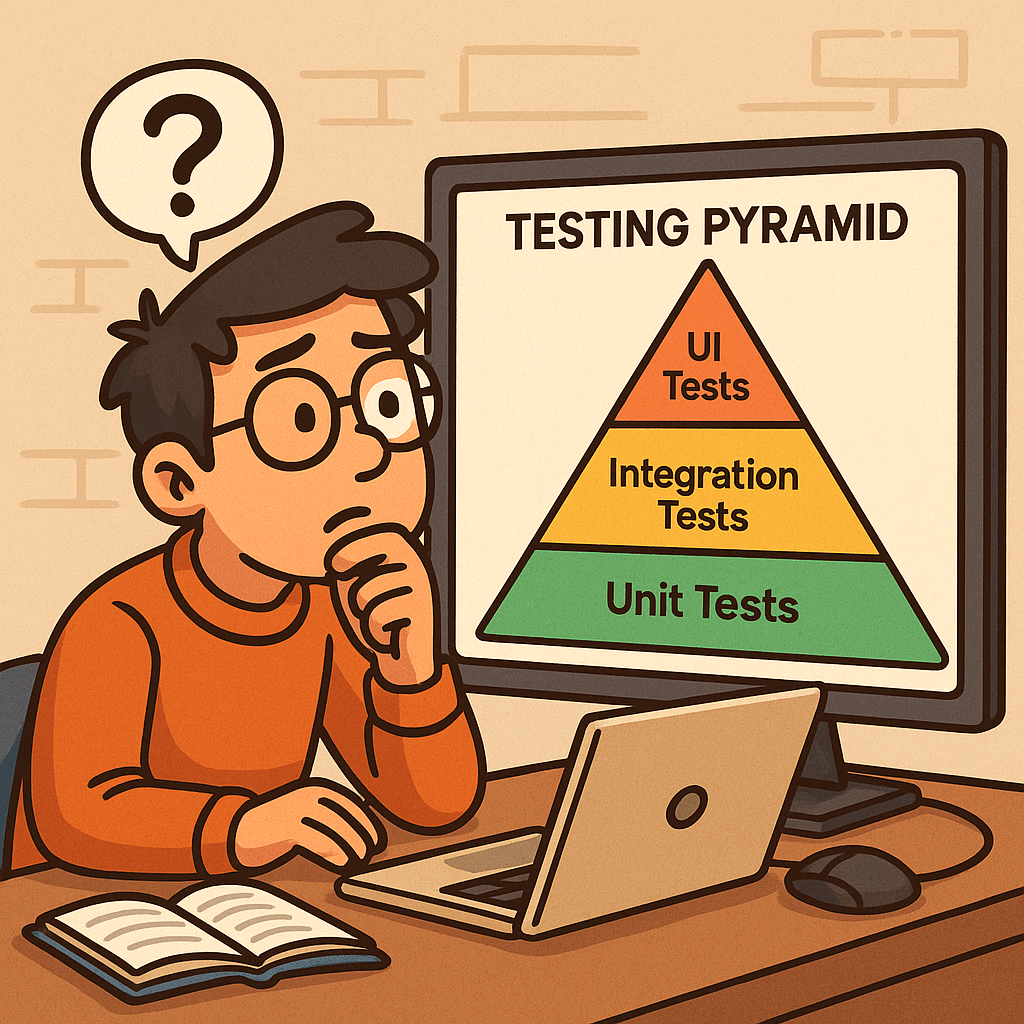
Learning testing pyramid

What is Software Testing and Why is it Important?

Software testing is the process of verifying that an application behaves as expected under different scenarios. It helps identify bugs, ensures that requirements are met, and improves overall software quality.

Without testing, defects can slip into production, leading to downtime, financial loss, and reduced user trust. Testing ensures reliability, maintainability, and customer satisfaction, which are critical for any successful software product.

A Brief History of Software Testing

The roots of software testing go back to the 1950s, when debugging was the main approach for identifying issues. In the 1970s and 1980s, formal testing methods and structured test cases emerged, as software systems grew more complex.

By the 1990s, unit tests, integration tests, and automated testing frameworks became more common, especially with the rise of Agile and Extreme Programming (XP). Today, testing is an integral part of the DevOps pipeline, ensuring continuous delivery of high-quality software.

What is the Testing Pyramid?
What is testing pyramid?

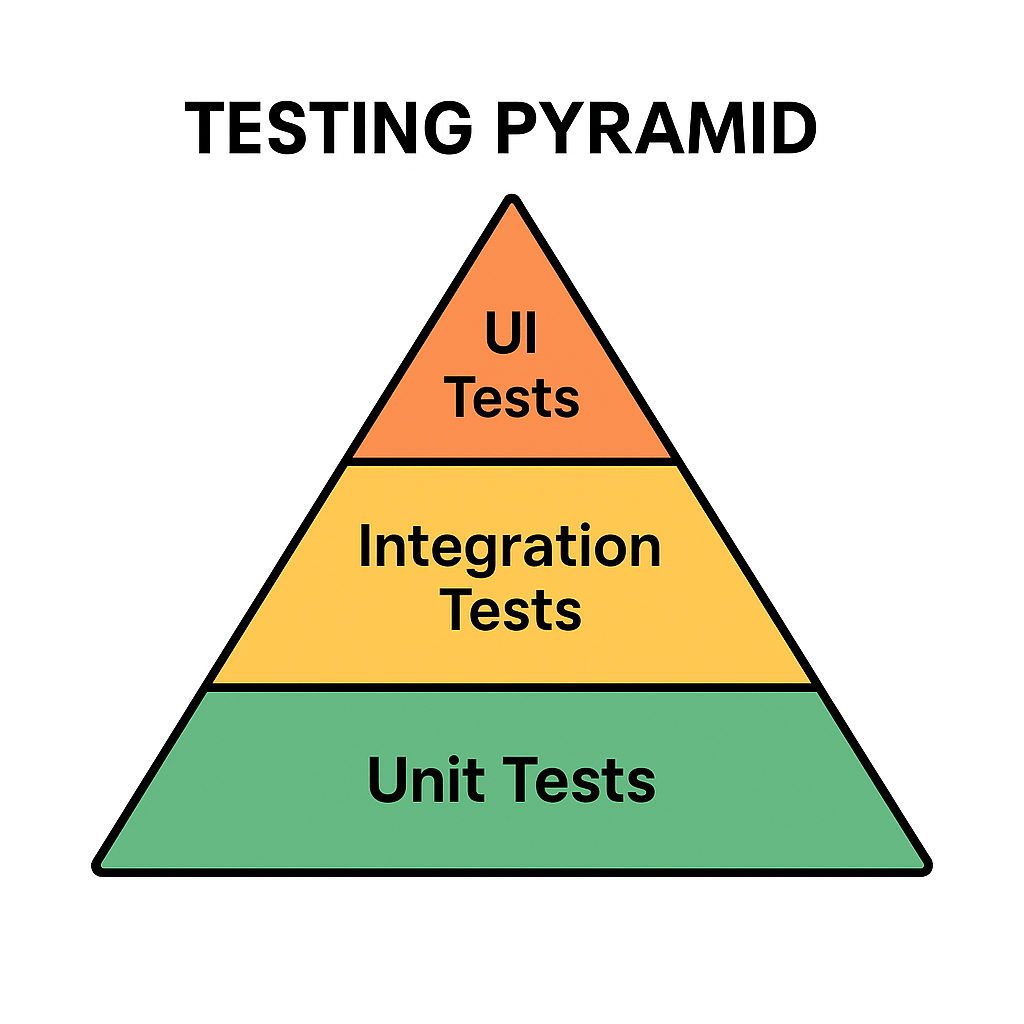
The Testing Pyramid is a concept introduced by Mike Cohn in his book Succeeding with Agile (2009). It illustrates the ideal distribution of automated tests across different levels of the software.

The pyramid has three main layers:

  • Unit Tests (Base): Small, fast tests that check individual components or functions.
  • Integration Tests (Middle): Tests that ensure multiple components work together correctly.
  • UI/End-to-End Tests (Top): High-level tests that simulate real user interactions with the system.

This structure emphasizes having many unit tests, fewer integration tests, and even fewer UI tests.

Why is the Testing Pyramid Important?

Modern applications are complex, and not all tests provide the same value. If teams rely too heavily on UI tests, testing becomes slow, brittle, and costly.

The pyramid encourages:

  • Speed: Unit tests are fast, allowing developers to catch issues early.
  • Reliability: A solid base of tests provides confidence that core logic works correctly.
  • Cost Efficiency: Fixing bugs early at the unit level is cheaper than discovering them at production.
  • Balance: Ensures that test coverage is spread across different levels without overloading any one type.

Benefits of the Testing Pyramid

Faster Feedback: Developers get immediate results from unit tests.
Reduced Costs: Bugs are caught before they cascade into bigger problems.
Better Test Coverage: A layered approach covers both individual components and overall workflows.
Maintainable Test Suite: Avoids having too many slow, brittle UI tests.
Supports Agile and DevOps: Fits seamlessly into CI/CD pipelines for continuous delivery.

Conclusion

The Testing Pyramid is more than just a model—it’s a guideline for building a scalable and maintainable test strategy. By understanding the history of software testing and adopting this layered approach, teams can ensure their applications are reliable, cost-effective, and user-friendly.

Whether you’re building a small project or a large enterprise system, applying the Testing Pyramid principles will strengthen your software delivery process.
Related Posts

Standard Operating Procedure (SOP) for Software Teams: Complete Guide + Template

Writing a SOP document for a software

A Standard Operating Procedure (SOP) is a versioned document that spells out the who, what, when, and how for a recurring task so it can be done consistently, safely, and audibly. Use SOPs for deployments, incident response, code review, releases, access management, and other repeatable work. This guide covers the essentials, gives you a ready-to-use outline, and walks you through creating your first SOP step-by-step.

What is an SOP?

A Standard Operating Procedure is a documented, approved set of instructions for performing a specific, repeatable activity. It removes ambiguity, reduces risk, and makes outcomes predictable—regardless of who is executing the task.

SOP vs Policy vs Process vs Work Instruction

  • Policy: The rule or intent (e.g., “All production changes must be reviewed.”)
  • Process: The flow of activities end-to-end (e.g., Change Management process)
  • SOP: The exact steps for one activity within the process (e.g., “Deploy Service X”)
  • Work Instruction/Runbook: Even more granular, task-level details or one-time playbooks

Why SOPs are important in software

  • Consistency & quality: Fewer “surprises” across releases and environments
  • Speed & scalability: New team members become productive faster
  • Risk reduction: Minimizes production incidents and security gaps
  • Auditability & compliance: Clear approvals, logs, and evidence trails
  • Knowledge continuity: Reduces “tribal knowledge” and single-points-of-failure

When should you create an SOP?

Create an SOP when any of these are true:

  • The task is repeated (deployments, hotfixes, on-call handoff, access requests)
  • Errors are costly (prod releases, database migrations, PII handling)
  • You need cross-team alignment (Dev, Ops, Security, QA, Support)
  • You face regulatory requirements (e.g., SOC 2/ISO 27001 evidence)
  • You’re onboarding new engineers or scaling the team
  • You just had an incident or near-miss—capture the fixed procedure

Common software SOP use-cases

  • Deployments & releases (blue/green, canary, rollback)
  • Incident response (SEV classification, roles, timelines, comms)
  • Code review & merge (branch strategy, checks, approvals)
  • Access management (least-privilege, approvals, periodic re-certs)
  • Security operations (vulnerability triage, secret rotation)
  • Data migrations & backups (restore tests, RTO/RPO validation)
  • Change management (CAB approvals, risk scoring)

Anatomy of an effective SOP (main sections)

  1. Title & ID (e.g., SOP-REL-001), Version, Dates, Owner, Approvers
  2. Purpose – Why this SOP exists
  3. Scope – Systems/teams/sites included and excluded
  4. Definitions & References – Glossary; links to policies/tools
  5. Roles & Responsibilities – RACI or simple role list
  6. Prerequisites – Access, permissions, tools, config, training
  7. Inputs & Outputs – What’s needed; what artifacts are produced
  8. Procedure (Step-by-Step) – Numbered, unambiguous steps with expected results
  9. Decision Points & Exceptions – If/then branches; when to stop/escalate
  10. Quality & Controls – Checks, gates, metrics, screenshots, evidence to capture
  11. Rollback/Recovery – How to revert safely; verification after rollback
  12. Verification & Acceptance – How success is confirmed; sign-off criteria
  13. Safety & Security Considerations – Data handling, secrets, least-privilege
  14. Communication Plan – Who to notify, channels, templates
  15. Records & Artifacts – Where logs, tickets, screenshots are stored
  16. Change History – Version table, what changed, by whom, when

A simple SOP outline you can follow

  • Title, ID, Version, Dates, Owner, Approvers
  • Purpose
  • Scope
  • Definitions & References
  • Roles & Responsibilities
  • Prerequisites
  • Procedure (numbered steps)
  • Rollback/Recovery
  • Verification & Acceptance
  • Communication Plan
  • Records & Artifacts
  • Change History

Tip: Start minimal. Add sections like Risk, KPIs, or Compliance mapping only if your team needs them.

Step-by-step: How to create a software SOP

  1. Pick a high-value, repeatable task
    Choose something painful or high-risk (e.g., production deployment).
  2. Interview doers & reviewers
    Shadow an engineer doing the task; note tools, commands, checks, and common pitfalls.
  3. Draft the outline
    Use the template below. Fill Purpose, Scope, Roles, and Prereqs first.
  4. Write the procedure as numbered steps
    Each step = one action + expected outcome. Add screenshots/CLI snippets if useful.
  5. Add guardrails
    Document pre-checks, approvals, gates (tests pass, vulnerability thresholds, etc.).
  6. Define rollback/recovery
    Make rollback scripted where possible; state verification after rollback.
  7. Clarify acceptance & evidence
    What proves success? Where are artifacts stored (ticket, pipeline, log path)?
  8. Peer review with all stakeholders
    Dev, QA, Ops/SRE, Security, Product—ensure clarity and feasibility.
  9. Pilot it live (with supervision)
    Run the SOP on a non-critical execution or during a planned release; fix gaps.
  10. Version, approve, publish
    Assign an ID, set review cadence (e.g., quarterly), store in a central, searchable place.
  11. Train & socialize
    Run a short walkthrough, record a quick demo, link from runbooks and onboarding docs.
  12. Measure & improve
    Track defects, time to complete, handoff success; update the SOP when reality changes.

Sample SOP template (Markdown)

# [SOP Title] — [SOP-ID]
**Version:** [1.0]  
**Effective Date:** [YYYY-MM-DD]  
**Owner:** [Role/Name]  
**Approvers:** [Roles/Names]  
**Review Cycle:** [Quarterly/Semi-Annual]

## 1. Purpose
[One paragraph explaining why this SOP exists and its outcome.]

## 2. Scope
**In scope:** [Systems/services/environments]  
**Out of scope:** [Anything explicitly excluded]

## 3. Definitions & References
- [Term] — [Definition]  
- References: [Links to policy, architecture, runbooks, dashboards]

## 4. Roles & Responsibilities
- Requester — [What they do]  
- Executor — [What they do]  
- Reviewer/Approver — [What they do]  
- On-call — [What they do]

## 5. Prerequisites
- Access/permissions: [Groups, accounts]  
- Tools: [CLI versions, VPN, secrets]  
- Pre-checks: [Tests green, health checks, capacity]

## 6. Inputs & Outputs
**Inputs:** [Ticket ID, branch/tag, config file]  
**Outputs:** [Release notes, change record, logs path, artifacts]

## 7. Procedure
1. [Step 1 action]. **Expected:** [Result/verification]. Evidence: [Screenshot/log/ticket comment].
2. [Step 2 action]. **Expected:** [Result/verification].
3. ...
N. [Final validation]. **Expected:** [SLIs/SLOs steady, no errors for 30 min].

## 8. Decision Points & Exceptions
- If [condition], then [action] and notify [channel/person].  
- If [threshold breached], execute rollback (Section 9).

## 9. Rollback / Recovery
1. [Rollback action or script].  
2. Validate: [Health checks, dashboards].  
3. Record: [Ticket comment, incident log].

## 10. Verification & Acceptance
- Success criteria: [Concrete metrics/checks]  
- Sign-off by: [Role/Name] within [time window]

## 11. Communication Plan
- Before: [Notify channel/template]  
- During: [Status cadence, who posts]  
- After: [Summary, recipients]

## 12. Records & Artifacts
- Ticket: [Link]  
- Pipeline run: [Link]  
- Logs: [Path/URL]  
- Evidence folder: [Link]

## 13. Safety & Security
- Data handling: [PII/PHI rules]  
- Secrets: [How managed, never in logs]  
- Access least-privilege: [Groups required]

## 14. Change History
| Version | Date       | Author     | Changes                          |
|---------|------------|------------|----------------------------------|
| 1.0     | YYYY-MM-DD | [Name]     | Initial SOP                      |

Example snippet: “Production Deployment SOP” (condensed)

  • Purpose: Safely deploy Service X to production with canary + automated rollback
  • Prereqs: CI green, security scan ≤ severity threshold, change record approved
  • Procedure (excerpt):
    1. Tag release in Git: vX.Y.Z. Expected: Pipeline starts (Link).
    2. Canary 10% traffic for 15 min. Expected: Error rate ≤ 0.2%; latency p95 ≤ baseline +10%.
    3. If metrics healthy, ramp to 50%, then 100%.
    4. Post-release verification: dashboards steady 30 min; run smoke tests.
  • Rollback: helm rollback service-x --to-revision=N; verify health; notify #prod-alerts.
  • Records: Attach pipeline run, screenshots, and smoke test results to the change ticket.

Practical tips for adoption

  • Write for 2 a.m. you: Clear, terse, step-by-step, with expected results and screenshots.
  • Make it discoverable: One URL per SOP; consistent naming; searchable IDs.
  • Automate where possible: Convert steps to scripts and CI/CD jobs; the SOP becomes the control layer.
  • Keep it living: Time-box reviews (e.g., quarterly) and update after every incident or major change.

Common mistakes to avoid

  • Vague steps with no expected outcomes
  • Missing rollback and verification criteria
  • No evidence trail for audits
  • Storing SOPs in scattered, private locations
  • Letting SOPs go stale (no review cadence)

Frequently asked questions

How long should an SOP be?
As short as possible while still safe. Use links for deep details.

Who owns an SOP?
A named role or person (e.g., Release Manager). Ownership ≠ sole executor.

Do we need SOPs if everything is automated?
Yes—SOPs define when to run automation, evidence to capture, and how to recover.

Final checklist (before you publish)

  • Purpose, Scope, Roles clear
  • Numbered steps with expected results
  • Rollback and verification defined
  • Evidence locations linked
  • Owner, Approvers, Version set
  • Review cadence scheduled

Blog at WordPress.com.

Up ↑