Search

Software Engineer's Notes

Tag

software-development

Understanding the Testing Pyramid in Software Development

Learning testing pyramid

What is Software Testing and Why is it Important?

Software testing is the process of verifying that an application behaves as expected under different scenarios. It helps identify bugs, ensures that requirements are met, and improves overall software quality.

Without testing, defects can slip into production, leading to downtime, financial loss, and reduced user trust. Testing ensures reliability, maintainability, and customer satisfaction, which are critical for any successful software product.

A Brief History of Software Testing

The roots of software testing go back to the 1950s, when debugging was the main approach for identifying issues. In the 1970s and 1980s, formal testing methods and structured test cases emerged, as software systems grew more complex.

By the 1990s, unit tests, integration tests, and automated testing frameworks became more common, especially with the rise of Agile and Extreme Programming (XP). Today, testing is an integral part of the DevOps pipeline, ensuring continuous delivery of high-quality software.

What is the Testing Pyramid?
What is testing pyramid?

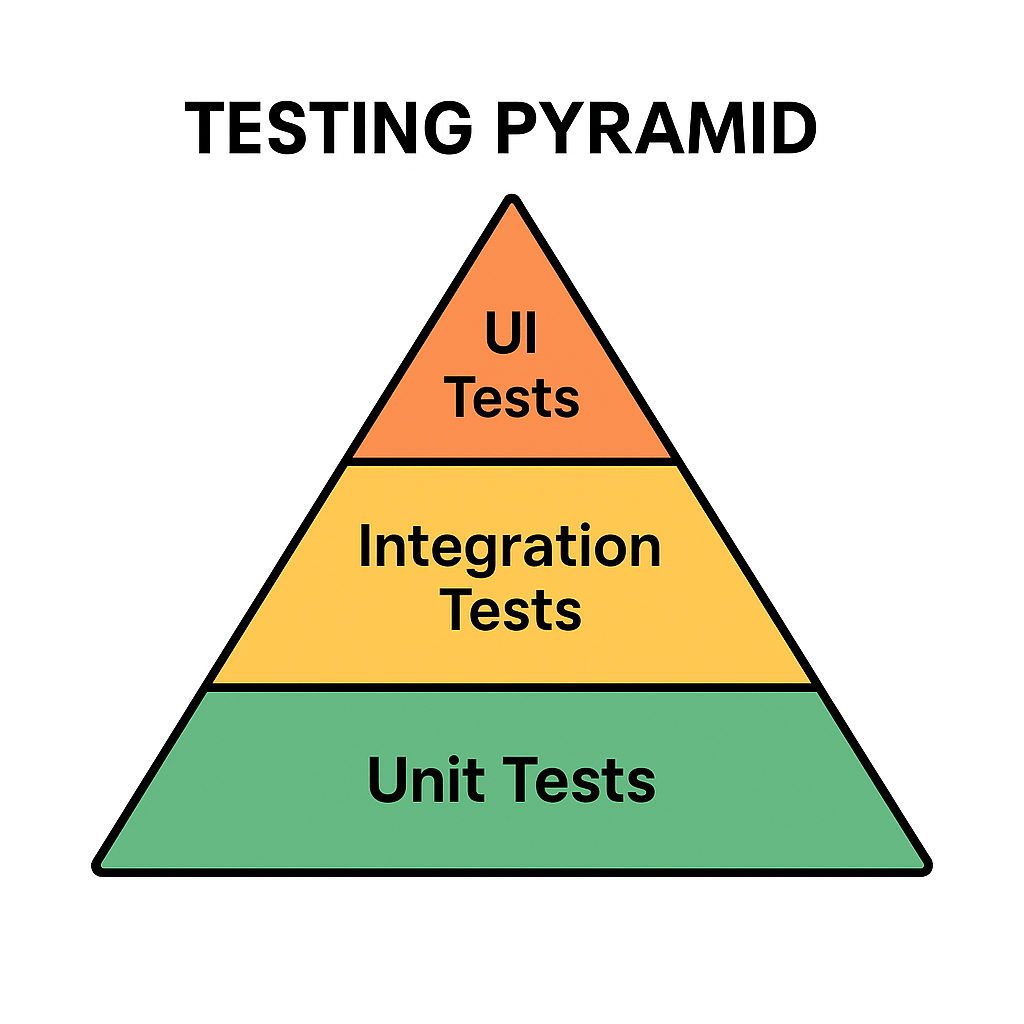
The Testing Pyramid is a concept introduced by Mike Cohn in his book Succeeding with Agile (2009). It illustrates the ideal distribution of automated tests across different levels of the software.

The pyramid has three main layers:

  • Unit Tests (Base): Small, fast tests that check individual components or functions.
  • Integration Tests (Middle): Tests that ensure multiple components work together correctly.
  • UI/End-to-End Tests (Top): High-level tests that simulate real user interactions with the system.

This structure emphasizes having many unit tests, fewer integration tests, and even fewer UI tests.

Why is the Testing Pyramid Important?

Modern applications are complex, and not all tests provide the same value. If teams rely too heavily on UI tests, testing becomes slow, brittle, and costly.

The pyramid encourages:

  • Speed: Unit tests are fast, allowing developers to catch issues early.
  • Reliability: A solid base of tests provides confidence that core logic works correctly.
  • Cost Efficiency: Fixing bugs early at the unit level is cheaper than discovering them at production.
  • Balance: Ensures that test coverage is spread across different levels without overloading any one type.

Benefits of the Testing Pyramid

Faster Feedback: Developers get immediate results from unit tests.
Reduced Costs: Bugs are caught before they cascade into bigger problems.
Better Test Coverage: A layered approach covers both individual components and overall workflows.
Maintainable Test Suite: Avoids having too many slow, brittle UI tests.
Supports Agile and DevOps: Fits seamlessly into CI/CD pipelines for continuous delivery.

Conclusion

The Testing Pyramid is more than just a model—it’s a guideline for building a scalable and maintainable test strategy. By understanding the history of software testing and adopting this layered approach, teams can ensure their applications are reliable, cost-effective, and user-friendly.

Whether you’re building a small project or a large enterprise system, applying the Testing Pyramid principles will strengthen your software delivery process.


Related Posts

RESTful APIs: A Practical Guide for Modern Web Services

What is Restful?

What is RESTful?

REST (Representational State Transfer) is an architectural style for designing networked applications. A RESTful API exposes resources (users, orders, posts, etc.) over HTTP using standard methods (GET, POST, PUT, PATCH, DELETE). The term and principles come from Roy Fielding’s 2000 doctoral dissertation, which defined the constraints that make web-scale systems reliable, evolvable, and performant.

Core REST Principles (with Real-World Examples)

Fielding’s REST defines a set of constraints. The more you follow them, the more “RESTful” your API becomes.

  1. Client–Server Separation
    UI concerns (client) are separate from data/storage (server).
    Example: A mobile banking app (client) calls the bank’s API (server) to fetch transactions. Either side can evolve independently.
  2. Statelessness
    Each request contains all information needed; the server stores no client session state.
    Example: Authorization: Bearer <token> is sent on every request so the server doesn’t rely on sticky sessions.
  3. Cacheability
    Responses declare whether they can be cached to improve performance and scalability.
    Example: Product catalog responses include Cache-Control: public, max-age=300 so CDNs can serve them for 5 minutes.
  4. Uniform Interface
    A consistent way to interact with resources: predictable URLs, standard methods, media types, and self-descriptive messages.
    Example:
    • Resource identification via URL: /api/v1/orders/12345
    • Standard methods: GET /orders/12345 (read), DELETE /orders/12345 (remove)
    • Media types: Content-Type: application/json
    • HATEOAS (optional): response includes links to related actions:
{
  "id": 12345,
  "status": "shipped",
  "_links": {
    "self": {"href": "/api/v1/orders/12345"},
    "track": {"href": "/api/v1/orders/12345/tracking"}
  }
}

  1. Layered System
    Clients don’t know if they’re talking to the origin server, a reverse proxy, or a CDN.
    Example: Your API sits behind an API gateway (rate limiting, auth) and a CDN (caching), yet clients use the same URL.
  2. Code on Demand (Optional)
    Servers may return executable code to extend client functionality.
    Example: A web client downloads JavaScript that knows how to render a new widget.

Expected Call & Response Features

  • Resource-oriented URLs
    • Collections: /api/v1/users
    • Single resource: /api/v1/users/42
  • HTTP methods: GET (safe), POST (create), PUT (replace, idempotent), PATCH (partial update), DELETE (idempotent)
  • HTTP status codes (see below)
  • Headers: Content-Type, Accept, Authorization, Cache-Control, ETag, Location
  • Bodies: JSON by default; XML/CSV allowed via Accept
  • Idempotency: PUT and DELETE should be idempotent; POST is typically not; PATCH may or may not be, depending on design
  • Pagination & Filtering: GET /orders?status=shipped&page=2&limit=20
  • Versioning: /api/v1/... or header-based (Accept: application/vnd.example.v1+json)
  • Error format (consistent, machine-readable):
{
  "error": "validation_error",
  "message": "Email is invalid",
  "details": {"email": "must be a valid address"},
  "traceId": "b1d2-..."
}

Common HTTP Status & Response Codes

  • 200 OK – Successful GET/PUT/PATCH/DELETE
  • 201 Created – Successful POST that created a resource (include Location header)
  • 202 Accepted – Request accepted for async processing (e.g., background job)
  • 204 No Content – Successful action with no response body (e.g., DELETE)
  • 304 Not Modified – Client can use cached version (with ETag)
  • 400 Bad Request – Malformed input
  • 401 Unauthorized – Missing/invalid credentials
  • 403 Forbidden – Authenticated but not allowed
  • 404 Not Found – Resource doesn’t exist
  • 409 Conflict – Versioning or business conflict
  • 415 Unsupported Media Type – Wrong Content-Type
  • 422 Unprocessable Entity – Validation failed
  • 429 Too Many Requests – Rate limit exceeded
  • 500/502/503 – Server or upstream errors

Example: RESTful Calls

Create a customer (POST):

curl -X POST https://api.example.com/v1/customers \
  -H "Content-Type: application/json" \
  -d '{"email":"ada@example.com","name":"Ada Lovelace"}'

Response (201 Created):

Location: /v1/customers/987

{"id":987,"email":"ada@example.com","name":"Ada Lovelace"}

Update customer (PUT idempotent):

curl -X PUT https://api.example.com/v1/customers/987 \
  -H "Content-Type: application/json" \
  -d '{"email":"ada@example.com","name":"Ada L."}'

Paginated list (GET):

curl "https://api.example.com/v1/customers?limit=25&page=3"

{
  "items": [/* ... */],
  "page": 3,
  "limit": 25,
  "_links": {
    "self": {"href": "/v1/customers?limit=25&page=3"},
    "next": {"href": "/v1/customers?limit=25&page=4"},
    "prev": {"href": "/v1/customers?limit=25&page=2"}
  }
}

When Should We Use RESTful?

  • Public APIs that need broad adoption (predictable, HTTP-native)
  • Microservices communicating over HTTP
  • Resource-centric applications (e.g., e-commerce products, tickets, posts)
  • Cross-platform needs (web, iOS, Android, IoT)

Benefits

  • Simplicity & ubiquity (uses plain HTTP)
  • Scalability (stateless + cacheable)
  • Loose coupling (uniform interface)
  • CDN friendliness and observability with standard tooling
  • Language-agnostic (works with any tech stack)

Issues / Pitfalls

  • Over/under-fetching (may need GraphQL for complex read patterns)
  • N+1 calls from chatty clients (batch endpoints or HTTP/2/3 help)
  • Ambiguous semantics if you ignore idempotency/safety rules
  • Versioning drift without a clear policy
  • HATEOAS underused, reducing discoverability

When to Avoid REST

  • Strict transactional workflows needing ACID across service boundaries (consider gRPC within a trusted network or orchestration)
  • Streaming/real-time event delivery (WebSockets, SSE, MQTT)
  • Heavy RPC semantics across many small operations (gRPC may be more efficient)
  • Enterprise contracts requiring formal schemas and WS-* features (SOAP may still fit legacy ecosystems)

Why Prefer REST over SOAP and RPC?

  • Human-readable & simpler than SOAP’s XML envelopes and WS-* stack
  • Native HTTP semantics (status codes, caching, content negotiation)
  • Lower ceremony than RPC (no strict interface stubs required)
  • Web-scale proven (born from the web’s architecture per Fielding)

(That said, SOAP can be right for legacy enterprise integrations; gRPC/RPC can excel for internal, low-latency service-to-service calls.)

Is REST Secure? How Do We Make It Secure?

REST can be very secure when you apply standard web security practices:

  1. Transport Security
    • Enforce HTTPS (TLS), HSTS, and strong cipher suites.
  2. Authentication & Authorization
    • OAuth 2.0 / OIDC for user auth (PKCE for public clients).
    • JWT access tokens with short TTLs; rotate refresh tokens.
    • API keys for server-to-server (limit scope, rotate, never in client apps).
    • Least privilege with scopes/roles.
  3. Request Validation & Hardening
    • Validate and sanitize all inputs (size limits, types, patterns).
    • Enforce idempotency keys for POSTs that must be idempotent (payments).
    • Set CORS policies appropriately (only trusted origins).
    • Use rate limiting, WAF, and bot protection.
    • Employ ETag + If-Match for optimistic concurrency control.
  4. Data Protection
    • Avoid sensitive data in URLs; prefer headers/body.
    • Encrypt secrets at rest; separate KMS for key management.
    • Mask/redact PII in logs.
  5. Headers & Best Practices
    • Content-Security-Policy, X-Content-Type-Options: nosniff,
      X-Frame-Options: DENY, Referrer-Policy.
    • Disable directory listings; correct Content-Type on all responses.
  6. Operational Security
    • Centralized logging/trace IDs; audit auth events.
    • Zero-trust network segmentation; mTLS inside the mesh where appropriate.
    • Regular penetration tests and dependency scanning.

Quick REST Design Checklist

  • Clear resource model and URL scheme
  • Consistent JSON shapes and error envelopes
  • Proper status codes + Location on creates
  • Pagination, filtering, sorting, and sparse-fieldsets
  • Idempotent PUT/DELETE; consider idempotency keys for POST
  • ETags and cache headers for read endpoints
  • Versioning strategy (path or media type)
  • OpenAPI/Swagger docs and examples
  • AuthZ scopes, rate limits, and monitoring in place

Final Thoughts

REST isn’t a silver bullet, but when you follow Fielding’s constraints—statelessness, cacheability, uniform interface, and layered design—you get services that scale, evolve, and integrate cleanly. Use REST where its strengths align with your needs; reach for SOAP, gRPC, GraphQL, WebSockets, or event streams where they fit better.

Binary Trees: A Practical Guide for Developers

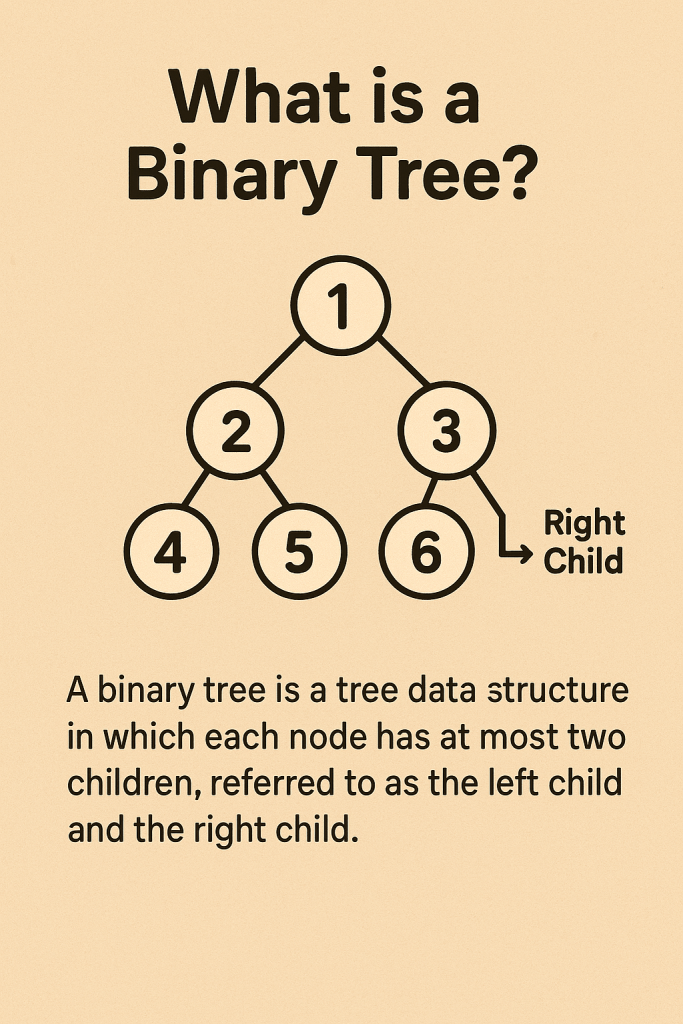
A binary tree is a hierarchical data structure where each node has at most two children. It’s great for ordered data, fast lookups/insertions (often near O(log n)), and in-order traversal. With balancing (AVL/Red-Black), performance becomes reliably logarithmic. Downsides include pointer overhead and potential O(n) worst-cases if unbalanced.

What Is a Binary Tree?

A binary tree is a collection of nodes where:

  • Each node stores a value.
  • Each node has up to two child references: left and right.
  • The top node is the root; leaf nodes have no children.

Common variants

  • Binary Search Tree (BST): Left subtree values < node < right subtree values (enables ordered operations).
  • Balanced BSTs: (e.g., AVL, Red-Black) keep height ≈ O(log n) for consistent performance.
  • Heap (Binary Heap): Complete tree with heap property (parent ≤/≥ children); optimized for min/max retrieval, not for sorted in-order traversals.
  • Full/Complete/Perfect Trees: Structural constraints that affect height and storage patterns.

Key terms

  • Height (h): Longest path from root to a leaf.
  • Depth: Distance from root to a node.
  • Subtree: A tree formed by a node and its descendants.

When Do We Need It?

Use a binary tree when you need:

  • Ordered data with frequent inserts/lookups (BSTs).
  • Sorted iteration via in-order traversal without extra sorting.
  • Priority access (heaps for schedulers, caches, and task queues).
  • Range queries (e.g., “all keys between A and M”) more naturally than in hash maps.
  • Memory-efficient dynamic structure that grows/shrinks without contiguous arrays.

Avoid it when:

  • You only need exact-key lookups with no ordering → Hash tables may be simpler/faster on average.
  • Data is largely sequential/indexedArrays/ArrayLists can be better.

Real-World Example

Autocomplete suggestions (by prefix):

  1. Store words in a BST keyed by the word itself (or a custom key like (prefix, word)).
  2. To suggest completions for prefix “em”, find the lower_bound (“em…”) node, then do in-order traversal while keys start with “em”.
  3. This provides sorted suggestions with efficient insertions as vocabulary evolves.
    (If extreme scale/branching is needed, a trie may be even better—but BSTs are a simple, familiar starting point.)

Another quick one: Task scheduling with a min-heap (a binary heap). The smallest deadline pops first in O(log n), ideal for job schedulers.

Main Operations & Complexity

On a (possibly unbalanced) Binary Search Tree

OperationAverage TimeWorst TimeSpace (extra)
Search (find key)O(log n)O(n)O(1) iterative; O(h) recursive
InsertO(log n)O(n)O(1) / O(h)
DeleteO(log n)O(n)O(1) / O(h)
In-order/Preorder/Postorder TraversalO(n)O(n)O(h)
Level-order (BFS)O(n)O(n)O(w) (w = max width)
  • n = number of nodes, h = height of the tree (worst n−1), w = max nodes at any level.
  • A balanced BST keeps h ≈ log₂n, making search/insert/delete reliably O(log n).

On a Binary Heap

OperationTime
Push/InsertO(log n)
Pop Min/MaxO(log n)
Peek Min/MaxO(1)
Build-heap (from array)O(n)

Space for the tree overall is O(n). Traversals use O(h) stack space recursively (or O(1) if done iteratively with your own stack/queue memory accounted as O(n) in BFS).

Core Operations Explained (BST)

  • Search: Compare key at node; go left if smaller, right if larger; stop when equal or null.
  • Insert: Search where the key would be; attach a new node there.
  • Delete:
    • Leaf: remove directly.
    • One child: bypass node (link parent → child).
    • Two children: replace value with in-order successor (smallest in right subtree), then delete that successor node.
  • Traversal:
    • In-order (LNR): yields keys in sorted order.
    • Preorder (NLR): useful for serialization/cloning.
    • Postorder (LRN): useful for deletions/freeing.

Advantages

  • Near-logarithmic performance for search/insert/delete with balancing.
  • Maintains order → easy sorted iteration and range queries.
  • Flexible structure → no need for contiguous memory; easy to grow/shrink.
  • Rich ecosystem → balanced variants (AVL, Red-Black), heaps, treaps, etc.

Disadvantages

  • Unbalanced worst-case can degrade to O(n) (e.g., inserting sorted data into a naive BST).
  • Pointer overhead per node (vs. compact arrays).
  • More complex deletes than arrays/lists or hash maps.
  • Cache-unfriendly due to pointer chasing (vs. contiguous arrays/heaps).

Practical Tips

  • If you need reliably fast operations, choose a self-balancing BST (AVL or Red-Black).
  • For priority queues, use a binary heap (typically array-backed, cache-friendlier).
  • For prefix/string-heavy tasks, consider a trie; for exact lookups without ordering, consider a hash map.
  • Watch out for recursion depth with very deep trees; consider iterative traversals.

Summary

Binary trees sit at the heart of many performant data structures. Use them when ordering matters, when you want predictable performance (with balancing), and when sorted traversals or range queries are common. Pick the specific variant—BST, balanced BST, or heap—based on your dominant operations.

Blog at WordPress.com.

Up ↑