Search

Software Engineer's Notes

Tag

programming

Understanding Queues in Computer Science

Learning queue

What is a Queue?

what is queue

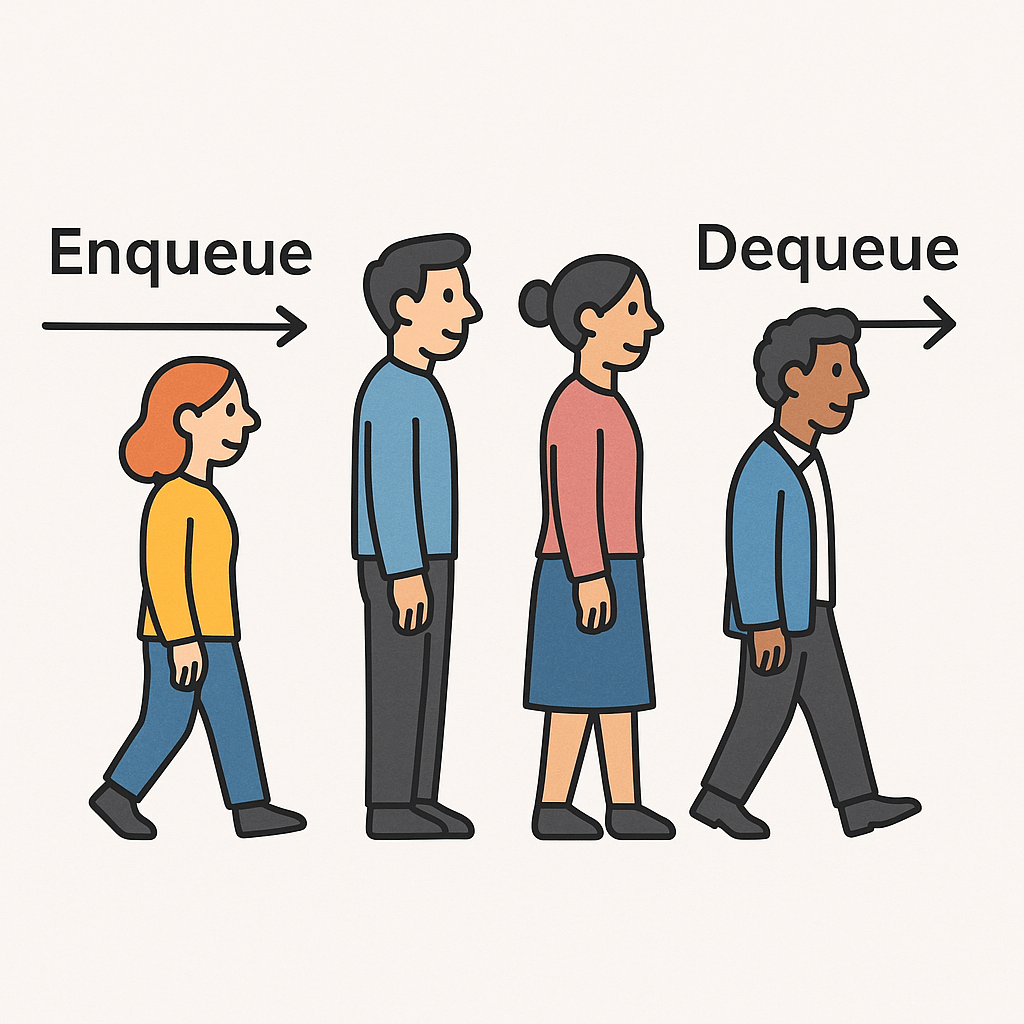
A queue is a fundamental data structure in computer science that follows the FIFO (First In, First Out) principle. This means the first element inserted into the queue will be the first one removed. You can imagine it like a line at a supermarket: the first person who gets in line is the first to be served.

Queues are widely used in software development for managing data in an ordered and controlled way.

Why Do We Need Queues?

Queues are important because they:

  • Maintain order of processing.
  • Prevent loss of data by ensuring all elements are handled in sequence.
  • Support asynchronous operations, such as task scheduling or handling requests.
  • Provide a reliable way to manage resources where multiple tasks compete for limited capacity (e.g., printers, processors).

When Should We Use a Queue?

You should consider using a queue when:

  • You need to process tasks in the order they arrive (job scheduling, message passing).
  • You need a buffer to handle producer-consumer problems (like streaming data).
  • You need fair resource sharing (CPU time slicing, printer spooling).
  • You’re managing asynchronous workflows, where events need to be handled one by one.

Real World Example

A classic example is a print queue.
When multiple users send documents to a printer, the printer cannot handle them all at once. Instead, documents are placed into a queue. The printer processes the first document added, then moves on to the next, ensuring fairness and order.

Another example is customer service call centers: calls are placed in a queue and answered in the order they arrive.

Time and Memory Complexities

Here’s a breakdown of queue operations:

  • Enqueue (Insert an element): O(1)
    Adding an element at the rear of the queue takes constant time.
  • Dequeue (Delete an element): O(1)
    Removing an element from the front of the queue also takes constant time.
  • Peek (Access the first element without removing it): O(1)
  • Memory Complexity: O(n)
    where n is the number of elements currently stored in the queue.

Queues are efficient because insertion and deletion do not require shifting elements (unlike arrays).

Conclusion

Queues are simple yet powerful data structures that help maintain order and efficiency in programming. By applying the FIFO principle, they ensure fairness and predictable behavior in real-world applications such as scheduling, buffering, and resource management.

Mastering queues is essential for every software engineer, as they are a cornerstone of many algorithms and system designs.

Code Refactoring: A Complete Guide for Software Developers

Code refactoring

What is Code Refactoring?

Code refactoring is the process of restructuring existing computer code without changing its external behavior. The main purpose is to improve the internal structure of the code—making it cleaner, easier to read, and more maintainable—without introducing new features or fixing bugs.

In simple terms, think of it as “tidying up” your code to make it better organized and easier to work with.

Why Do We Need Code Refactoring?

Over time, software projects grow and evolve. As new features are added quickly, the codebase may become cluttered, repetitive, or difficult to maintain. Refactoring helps:

  • Reduce technical debt.
  • Improve code readability for current and future developers.
  • Enhance maintainability and reduce the risk of bugs.
  • Support scalability as the project grows.
  • Improve performance in some cases.

Main Concepts of Code Refactoring

When refactoring, developers usually follow some guiding concepts:

  1. Clean Code – Code should be easy to read, simple, and expressive.
  2. DRY (Don’t Repeat Yourself) – Remove code duplication.
  3. KISS (Keep It Simple, Stupid) – Avoid overcomplicated solutions.
  4. Single Responsibility Principle (SRP) – Each class, method, or function should do one thing well.
  5. YAGNI (You Aren’t Gonna Need It) – Avoid adding unnecessary functionality before it’s required.

Best Practices for Code Refactoring

To refactor successfully, follow these best practices:

  • Write tests before refactoring: Ensure that the code’s behavior remains the same after changes.
  • Small steps, frequent commits: Don’t attempt massive refactoring in one go; take incremental steps.
  • Automated tools: Use IDE features like “extract method,” “rename,” or linters to catch issues.
  • Code reviews: Have peers review refactored code for better quality.
  • Refactor regularly: Make it part of your development cycle instead of waiting until the code becomes unmanageable.

How Should We Use Refactoring in Our Projects?

  • Integrate refactoring into Agile sprints while working on new features.
  • Refactor during bug fixing when messy code makes issues hard to track.
  • Apply the “Boy Scout Rule”: Always leave the code cleaner than you found it.
  • Use CI/CD pipelines to run tests automatically after refactoring.

Benefits of Code Refactoring

  • Improved readability → Easier onboarding of new team members.
  • Reduced complexity → Simplified logic and structure.
  • Lower maintenance cost → Fewer bugs and easier updates.
  • Increased reusability → Cleaner components can be reused in other parts of the project.
  • Higher development speed → Developers spend less time understanding messy code.

Issues and Challenges of Code Refactoring

Despite its benefits, refactoring can pose challenges:

  • Risk of introducing bugs if tests are not comprehensive.
  • Time constraints in fast-paced projects may limit refactoring opportunities.
  • Lack of tests in legacy systems makes safe refactoring difficult.
  • Resistance from stakeholders who prefer adding new features over code improvements.

Conclusion

Code refactoring is not just a technical activity—it’s an investment in the long-term health of your software project. By applying it consistently with best practices, you ensure that your codebase remains clean, efficient, and adaptable for future growth.

Remember: Refactoring is not a one-time effort but a continuous process that should become part of your development culture.

Code Katas: A Practical Guide for Your Everyday Engineering Practice

Learning code kata

What are Code Katas?

Code katas are short, repeatable programming exercises designed to improve specific skills through deliberate practice. Borrowed from martial arts, the term “kata” refers to a structured routine you repeat to refine form, speed, and judgment. In software, that means repeatedly solving small problems with intention—focusing on technique (naming, refactoring, testing, decomposition) rather than “just getting it to work.”

A Brief History

  • Origins of the term: Inspired by martial arts training, the “kata” metaphor entered software craftsmanship to emphasize practice and technique over ad-hoc hacking.
  • Popularization: In the early 2000s, the idea spread through the software craftsmanship movement and communities around Agile, TDD, and clean code. Well-known exercises (e.g., Bowling Game, Roman Numerals, Gilded Rose) became common practice drills in meetups, coding dojos, and workshops.
  • Today: Katas are used by individuals, teams, bootcamps, and user groups to build muscle memory in test-driven development (TDD), refactoring, design, and problem decomposition.

Why We Need Code Katas (Benefits)

  • Deliberate practice: Target a narrow skill (e.g., TDD rhythm, naming, edge-case thinking) and improve it fast.
  • Muscle memory for TDD: Red-Green-Refactor becomes automatic under time pressure.
  • Design intuition: Frequent refactoring grows your “smell” for better abstractions and simpler designs.
  • Safer learning: Fail cheaply in a sandbox instead of production.
  • Team alignment: Shared exercises align standards for testing, style, and architecture.
  • Confidence & speed: Repetition reduces hesitation; you ship with fewer regressions.
  • Interview prep: Katas sharpen fundamentals without “trick” problems.

Main Characteristics (and How to Use Them)

  1. Small Scope
    What it is: A compact problem (30–90 minutes).
    How to use: Choose tasks with clear correctness criteria (e.g., string transforms, calculators, parsers).
  2. Repetition & Variation
    What it is: Solve the same kata multiple times, adding constraints.
    How to use: Repeat weekly; vary approach (different data structures, patterns, or languages).
  3. Time-Boxing
    What it is: Short, focused sessions to keep intensity high.
    How to use: 25–45 minute blocks (Pomodoro); stop when time ends and reflect.
  4. TDD Rhythm
    What it is: Red → Green → Refactor loop.
    How to use: Write the smallest failing test, make it pass, then improve the design. Repeat.
  5. Constraints
    What it is: Self-imposed rules to sharpen technique.
    How to use: Examples: “no if statements,” “immutable data only,” “only functional style,” “one assert per test.”
  6. Frequent Refactoring
    What it is: Continual cleanup to reveal better design.
    How to use: After every green step, improve names, extract methods, remove duplication.
  7. Feedback & Reflection
    What it is: Short retrospective at the end.
    How to use: Capture what slowed you down, smells you saw, patterns you used, and what to try next time.
  8. Social Formats (Dojo/Pair/Mob)
    What it is: Practice together.
    How to use:
    • Pair kata: Driver/Navigator switch every 5–7 minutes.
    • Mob kata: One keyboard; rotate driver; everyone else reviews and guides.
    • Dojo: One person solves while others observe; rotate and discuss.

How to Use Code Katas (Step-by-Step)

  1. Pick one skill to train (e.g., “fewer conditionals,” “clean tests,” “naming”).
  2. Choose a kata that fits the skill and your time (30–60 min).
  3. Set a constraint aligned to your skill (e.g., immutability).
  4. Run TDD cycles with very small steps; keep tests crisp.
  5. Refactor relentlessly; remove duplication, clarify intent.
  6. Stop on time; retrospect (what went well, what to try next).
  7. Repeat the same kata next week with a new constraint or language.

Real-World Kata Examples (with What They Teach)

  • String Calculator
    Teaches: TDD rhythm, incremental parsing, edge cases (empty, delimiters, negatives).
  • Roman Numerals
    Teaches: Mapping tables, greedy algorithms, clear tests, refactoring duplication.
  • Bowling Game Scoring
    Teaches: Complex scoring rules, stepwise design, test coverage for tricky cases.
  • Gilded Rose Refactoring
    Teaches: Working with legacy code, characterization tests, safe refactoring.
  • Mars Rover
    Teaches: Command parsing, state modeling, encapsulation, test doubles.
  • FizzBuzz Variants
    Teaches: Simple loops, branching alternatives (lookup tables, rules engines), constraint-driven creativity.
  • Anagrams / Word Ladder
    Teaches: Data structures, performance trade-offs, readability vs speed.

Sample Kata Plan (30 Days)

  • Week 1 — TDD Basics: String Calculator (x2), Roman Numerals (x2)
  • Week 2 — Refactoring: Gilded Rose (x2), FizzBuzz with constraints (no if)
  • Week 3 — Design: Mars Rover (x2), Bowling Game (x2)
  • Week 4 — Variation: Repeat two favorites in a new language or paradigm (OO → FP)

Tip: Track each session in a short log: date, kata, constraint, what improved, next experiment.

Team Formats You Can Try

  • Lunchtime Dojo (45–60 min): One kata, rotate driver every test.
  • Pair Fridays: Everyone pairs; share takeaways at stand-up.
  • Mob Monday: One computer; rotate every 5–7 minutes; prioritize learning over finishing.
  • Guild Nights: Monthly deep-dives (e.g., legacy refactoring katas).

Common Pitfalls (and Fixes)

  • Rushing to “final code”Fix: Celebrate tiny, green, incremental steps.
  • Over-engineering earlyFix: You Aren’t Gonna Need It” (YAGNI). Refactor after tests pass.
  • Giant testsFix: One behavior per test; clear names; one assert pattern.
  • Skipping retrosFix: Reserve 5 minutes to write notes and choose a new constraint.

Simple Kata Template

Goal: e.g., practice small TDD steps and expressive names
Constraint: e.g., no primitives as method params; use value objects
Time-box: e.g., 35 minutes

Plan:

  1. Write the smallest failing test for the next slice of behavior.
  2. Make it pass as simply as possible.
  3. Refactor names/duplication before the next test.
  4. Repeat until time ends; then write a short retrospective.

Retrospective Notes (5 min):

  • What slowed me down?
  • What code smells did I notice?
  • What pattern/principle helped?
  • What constraint will I try next time?

Example: “String Calculator” (TDD Outline)

  1. Returns 0 for ""
  2. Returns number for single input "7"
  3. Sums two numbers "1,2"3
  4. Handles newlines "1\n2,3"6
  5. Custom delimiter "//;\n1;2"3
  6. Rejects negatives with message
  7. Ignores numbers > 1000
  8. Refactor: extract parser, value object for tokens, clean error handling

When (and When Not) to Use Katas

Use katas when:

  • You want to build fluency in testing, refactoring, or design.
  • Onboarding a team to shared coding standards.
  • Preparing for interviews or new language paradigms.

Avoid katas when:

  • You need domain discovery or system design at scale (do spikes instead).
  • You’re under a hard delivery deadline—practice sessions shouldn’t cannibalize critical delivery time.

Getting Started (Quick Checklist)

  • Pick one kata and one skill to train this week.
  • Book two 30–45 minute time-boxes in your calendar.
  • Choose a constraint aligned with your skill.
  • Practice, then write a short retro.
  • Repeat the same kata next week with a variation.

Pair Programming: Working Together for Better Code

Pair programming

What is Pair Programming?

Pair programming is a software development technique where two programmers work together at one workstation. One developer, called the Driver, writes the code, while the other, the Observer or Navigator, reviews each line of code as it is typed. They frequently switch roles, ensuring both remain engaged and focused.

Why Do We Need Pair Programming?

Software development is complex, and mistakes are easy to make when working alone. Pair programming helps reduce errors, improves code quality, and encourages knowledge sharing between team members. It also fosters collaboration, which is essential in agile teams.

A Brief History of Pair Programming

Pair programming became popular in the late 1990s with the rise of Extreme Programming (XP), an agile software development methodology introduced by Kent Beck. XP emphasized practices that increased communication, feedback, and simplicity—pair programming being one of the core practices. Over time, this approach has been adopted in many agile teams worldwide.

Benefits of Pair Programming

  • Higher Code Quality: Continuous code review reduces bugs and improves design.
  • Faster Knowledge Transfer: Developers learn from each other in real time.
  • Improved Team Communication: Encourages collaboration and trust.
  • Problem Solving: Two minds tackling a problem often find better solutions.
  • Reduced Knowledge Silos: Knowledge of the codebase is spread across the team.

Advantages of Pair Programming

  • Fewer bugs and higher quality code.
  • Enhanced learning opportunities for junior developers.
  • Improved team dynamics and collaboration.
  • Helps maintain coding standards consistently.

Disadvantages of Pair Programming

  • Increased Costs: Two developers working on one task may seem less efficient.
  • Personality Conflicts: Not all developers enjoy working closely with others.
  • Fatigue: Pairing requires constant focus, which can be tiring over time.
  • Not Always Necessary: For simple or repetitive tasks, solo programming might be faster.

Should We Use Pair Programming in Our Projects?

The decision depends on the project and team culture. Pair programming works best when:

  • The project is complex and requires careful design.
  • You have new team members who need to learn quickly.
  • Code quality is critical (e.g., healthcare, finance, security applications).
  • Collaboration and team bonding are important goals.

However, it might not be ideal for short, simple tasks or when deadlines are extremely tight. A hybrid approach, where pair programming is used strategically for complex or high-risk parts of a project, often delivers the best results.

Test Driven Development (TDD): A Complete Guide

Learning Test Driven Evelopment

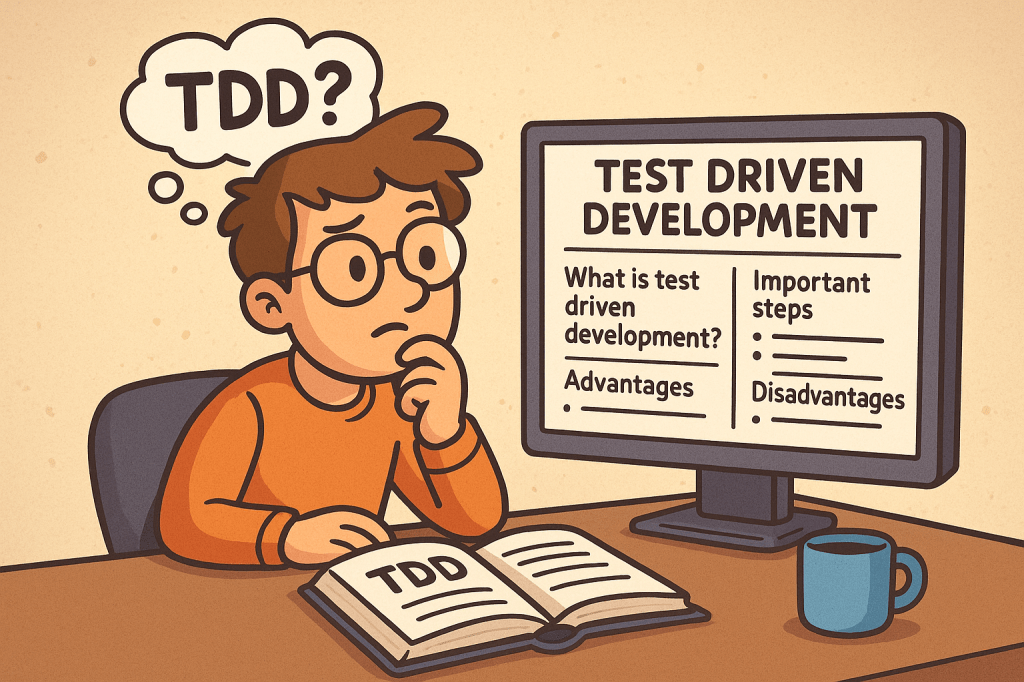
What is Test Driven Development?

Test Driven Development (TDD) is a software development practice where tests are written before the actual code. The main idea is simple: first, you write a failing test that defines what the software should do, then you write just enough code to make the test pass, and finally, you improve the code through refactoring.

TDD encourages developers to focus on requirements and expected behavior rather than jumping directly into implementation details.

A Brief History of TDD

TDD is closely tied to Extreme Programming (XP), introduced in the late 1990s by Kent Beck. Beck emphasized automated testing as a way to improve software quality and developer confidence. While unit testing existed earlier, TDD formalized the cycle of writing tests before writing code and popularized it as a disciplined methodology.

How Does TDD Work?

TDD typically follows a simple cycle, often called Red-Green-Refactor:

  1. Red – Write a small test that fails because the functionality does not exist yet.
  2. Green – Write the minimum code required to pass the test.
  3. Refactor – Improve the code structure without changing its behavior, while keeping all tests passing.

This cycle is repeated for each new piece of functionality until the feature is fully developed.

Important Steps in TDD

  • Understand requirements clearly before starting.
  • Write a failing test case for the expected behavior.
  • Implement code to make the test pass.
  • Run all tests to ensure nothing else is broken.
  • Refactor code for clarity, performance, and maintainability.
  • Repeat for each new requirement or functionality.

Advantages of TDD

  • Ensures better code quality and fewer bugs.
  • Encourages modular and clean code design.
  • Provides a safety net for refactoring and adding new features.
  • Reduces debugging time since most errors are caught early.
  • Improves developer confidence and project maintainability.

Disadvantages of TDD

  • Initial learning curve can be steep for teams new to the practice.
  • Writing tests first may feel slower at the beginning.
  • Requires discipline and consistency; skipping steps reduces its effectiveness.
  • Not always practical for UI-heavy applications or experimental projects.

Should We Use TDD in Our Projects?

The decision depends on your project type, deadlines, and team maturity. TDD works best in:

  • Long-term projects that need high maintainability.
  • Systems requiring reliability and accuracy (e.g., finance, healthcare, safety systems).
  • Teams practicing Agile or XP methodologies.

For quick prototypes or proof-of-concepts, TDD might not always be the best choice.

Integrating TDD into the Software Development Cycle

  • Combine TDD with Agile or Scrum for iterative development.
  • Use Continuous Integration (CI) pipelines to automatically run tests on every commit.
  • Pair TDD with code review practices for stronger quality control.
  • Start with unit tests, then expand to integration and system tests.
  • Train your team with small exercises, such as Kata challenges, to build TDD discipline.

Conclusion

Test Driven Development is more than just writing tests; it’s a mindset that prioritizes quality, clarity, and confidence in your code. While it requires discipline and may feel slow at first, TDD pays off in the long run by reducing bugs, improving maintainability, and making your development process more predictable.

If your project values stability, collaboration, and scalability, then TDD is a powerful practice to adopt.

Extreme Programming (XP): A Complete Guide

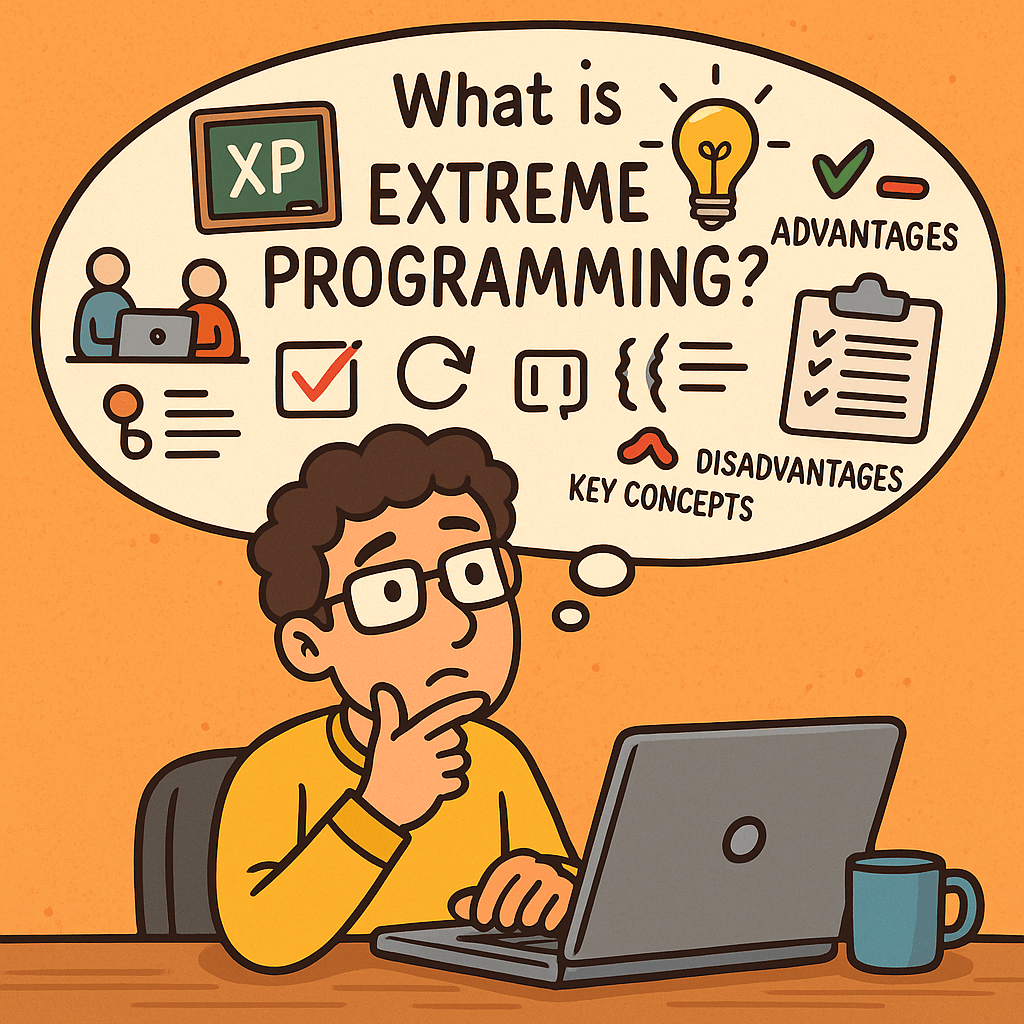
What is Extreme Programming?

Extreme Programming (XP) is an agile software development methodology that emphasizes customer satisfaction, flexibility, and high-quality code. It focuses on short development cycles, frequent releases, constant communication with stakeholders, and continuous improvement. The name “extreme” comes from the idea of taking best practices in software development to an extreme level—such as testing, code reviews, and communication.

A Brief History of Extreme Programming

Extreme Programming was introduced in the late 1990s by Kent Beck while he was working on the Chrysler Comprehensive Compensation System (C3 project). Beck published the book Extreme Programming Explained in 1999, which formalized the methodology.
XP emerged at a time when traditional software development methods (like the Waterfall model) struggled with rapid change, unclear requirements, and long delivery cycles. XP provided an alternative: a flexible, customer-driven approach aligned with the Agile Manifesto (2001).

Key Concepts of Extreme Programming

XP is built around several fundamental concepts:

  • Communication – Constant interaction between developers, customers, and stakeholders.
  • Simplicity – Keep designs and code as simple as possible, avoiding over-engineering.
  • Feedback – Continuous feedback from customers and automated tests.
  • Courage – Developers should not fear changing code, improving design, or discarding work.
  • Respect – Teams value each other’s work and contributions.

Core Practices of Extreme Programming

XP emphasizes a set of engineering practices that make the methodology unique. Below are its key practices with explanations:

1. Pair Programming

Two developers work together at one workstation. One writes code (the driver) while the other reviews in real-time (the observer). This increases code quality and knowledge sharing.

2. Test-Driven Development (TDD)

Developers write automated tests before writing the actual code. This ensures the system works as intended and reduces defects.

3. Continuous Integration

Developers integrate code into the shared repository several times a day. Automated tests run on each integration to detect issues early.

4. Small Releases

Software is released in short cycles (e.g., weekly or bi-weekly), delivering incremental value to customers.

5. Refactoring

Developers continuously improve the structure of code without changing its functionality. This keeps the codebase clean and maintainable.

6. Coding Standards

The whole team follows the same coding guidelines to maintain consistency.

7. Collective Code Ownership

No piece of code belongs to one developer. Everyone can change any part of the code, which increases collaboration and reduces bottlenecks.

8. Simple Design

Developers design only what is necessary for the current requirements, avoiding unnecessary complexity.

9. On-Site Customer

A real customer representative is available to the team daily to provide feedback and clarify requirements.

10. Sustainable Pace (40-hour work week)

Developers should avoid burnout. XP discourages overtime to maintain productivity and quality over the long term.

Advantages of Extreme Programming

  • High customer satisfaction due to continuous involvement.
  • Improved software quality from TDD, pair programming, and continuous integration.
  • Flexibility to adapt to changing requirements.
  • Better teamwork and communication.
  • Frequent releases ensure value is delivered early.

Disadvantages of Extreme Programming

  • Requires strong discipline from developers to follow practices consistently.
  • High customer involvement may be difficult to maintain.
  • Pair programming can feel costly and inefficient if not done correctly.
  • Not suitable for very large teams without adjustments.
  • May seem chaotic to organizations used to rigid structures.

Do We Need Extreme Programming in Software Development?

The answer depends on your team size, project type, and customer needs.

  • XP is highly effective in projects with uncertain requirements, where customer collaboration is possible.
  • It is valuable when quality and speed are equally important, such as in startups or rapidly evolving industries.
  • However, if your team is large, distributed, or your customers cannot commit to daily involvement, XP may not be the best fit.

In conclusion, XP is not a one-size-fits-all solution, but when applied correctly, it can significantly improve both product quality and team morale.

Binary Search Trees (BST): A Practical Guide for Developers

Learning Binary Search Tree

A Binary Search Tree (BST) stores keys in sorted order so you can search, insert, and delete efficiently—typically in O(log n) time—if the tree stays balanced. It’s great when you need ordered data + fast lookups, but you must guard against becoming skewed (which degrades to O(n)).

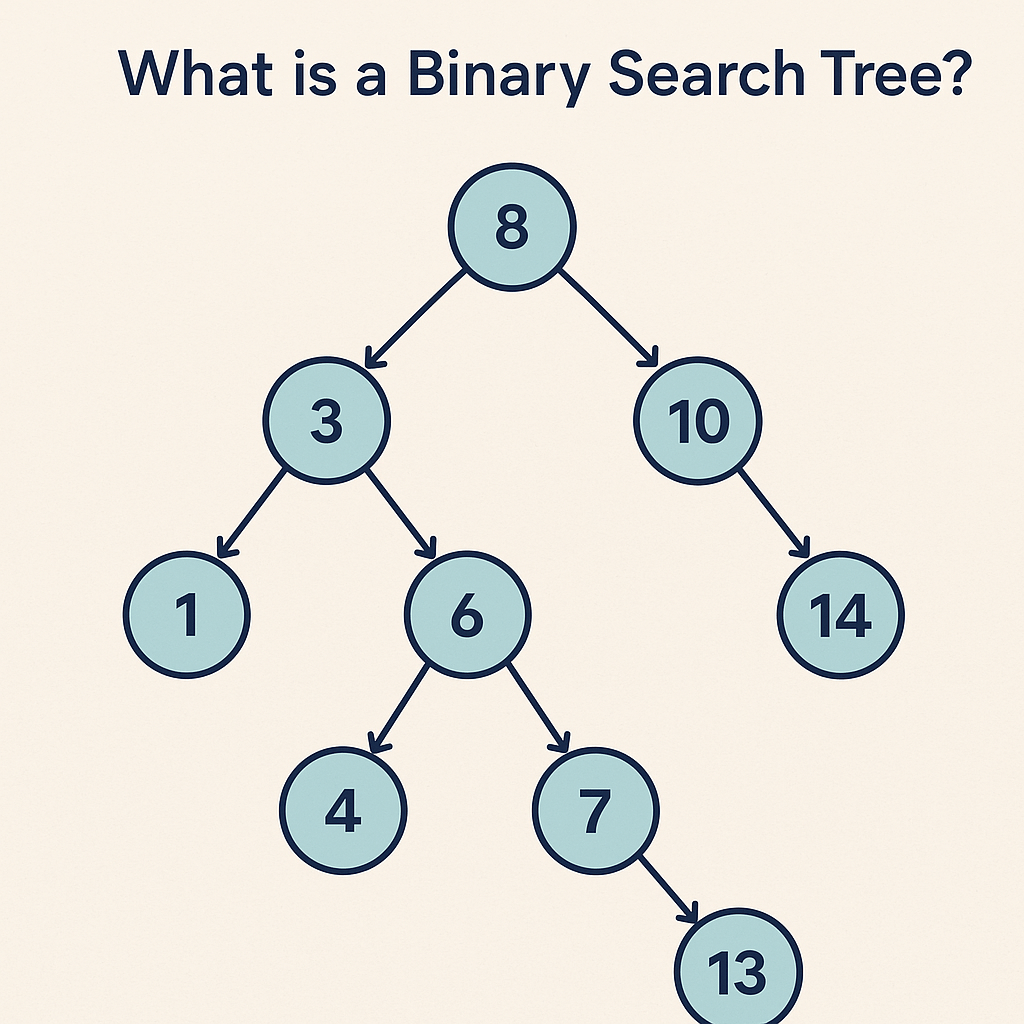
What is a Binary Search Tree?

What is a Binary Search Tree?

A Binary Search Tree (BST) is a binary tree where each node holds a key (and usually a value) and satisfies the BST property:

  • All keys in the left subtree are less than the node’s key.
  • All keys in the right subtree are greater than the node’s key.
  • This property holds recursively for every node.

Because the keys are kept in sorted order, BSTs support ordered operations such as range queries and in-order traversal (which yields sorted output).

When Do We Need a BST?

Use a BST when you need both:

  1. Fast lookups/updates (ideally ~O(log n)), and
  2. Ordering-aware queries, like:
    • “Give me all keys between A and M.”
    • “What’s the next larger (successor) or next smaller (predecessor) key?”
    • “Iterate results in sorted order.”

Common cases:

  • In-memory indexes (e.g., sorted maps/dictionaries).
  • Implementing priority features with order-aware operations (though heaps are better for pure min/max).
  • Autocomplete / prefix features (often with tries for strings, but BSTs work when comparing whole keys).
  • Scheduling or event timelines where you frequently need “next event after time T.”

If you only need existence lookups without ordering, a hash table might be simpler and faster on average.

Real-World Example

E-commerce product catalog: Keep products keyed by productId or price.

  • Search a product quickly by ID.
  • List products in a price range (e.g., $25–$50) with an in-order traversal constrained to that range.
  • Find the next higher-priced product (successor) for upsell suggestions.

Balanced BSTs (like AVL or Red-Black Trees) power the ordered collections in many standard libraries (e.g., TreeMap in Java, std::map in C++).

Main Operations

  • Search(key): Compare key at node, go left if smaller, right if larger, stop when found or null.
  • Insert(key, value): Standard BST insert followed by optional rebalancing (in self-balancing variants).
  • Delete(key): Three cases
    1. Node has no child → remove it.
    2. Node has one child → replace node with its child.
    3. Node has two children → replace with in-order successor (smallest in right subtree) or predecessor, then delete that successor/predecessor node.
  • Traversal:
    • In-order → sorted order.
    • Pre-order/Post-order → useful for copying/deletion tasks.
  • Min/Max: Follow left/right pointers to extremes.
  • Successor/Predecessor: Use right/left subtree, or walk up via parent pointers if available.

Time & Space Complexity

OperationAverage (Balanced)Worst Case (Skewed)
SearchO(log n)O(n)
InsertO(log n)O(n)
DeleteO(log n)O(n)
Find min/max, successor/predecessorO(log n)O(n)
Space (n nodes)O(n)O(n)

In practice, self-balancing BSTs (AVL, Red-Black) keep height ≈ O(log n), ensuring predictable performance.

Advantages

  • Maintains order: Easy to output or traverse in sorted order.
  • Efficient range queries: Retrieve keys within [L, R] without scanning everything.
  • Deterministic memory: Pointer-based structure with O(n) space.
  • Extensible: Augment nodes with extra data (e.g., subtree size for order statistics, sums for range aggregates).

Disadvantages

  • Can degrade to O(n) if unbalanced (e.g., inserting already-sorted keys into a naive BST).
  • More complex deletions compared to hash tables or arrays.
  • Higher constant factors than hash tables for pure key→value lookups (when ordering isn’t needed).
  • Implementation complexity increases with self-balancing (AVL/Red-Black rotations, color/height tracking).

BST vs. Alternatives (Quick Compare)

  • BST vs. Hash Table
    • BST: Ordered, range queries, successor/predecessor → Yes.
    • Hash: Average O(1) lookups, no order → great for pure key lookups.
  • BST vs. Array
    • BST: Fast inserts/deletes (O(log n) balanced) and maintains order.
    • Sorted array: Fast binary search (O(log n)), but inserts/deletes O(n).
  • BST vs. Heap
    • BST: Get any key, do range queries, get successor/predecessor.
    • Heap: Fastest min/max access, but no ordered iteration.

Practical Tips & Pitfalls

  • Prefer self-balancing variants (e.g., AVL for tighter balance, Red-Black for simpler updates) in production.
  • To avoid skew, shuffle inputs or insert in mixed order if you must use a basic BST.
  • For heavy range queries, consider augmented BSTs (store subtree counts/sums) or B-trees for disk-based indices.
  • Use in-order traversal to stream results in sorted order without extra sorting cost.

Summary

A Binary Search Tree is a powerful, order-preserving data structure. Choose it when you need fast queries and ordering semantics—especially with self-balancing variants to maintain consistent O(log n) operations. If you don’t need order, a hash table is often simpler and faster; if you need just min/max, a heap may suffice.

RESTful APIs: A Practical Guide for Modern Web Services

What is Restful?

What is RESTful?

REST (Representational State Transfer) is an architectural style for designing networked applications. A RESTful API exposes resources (users, orders, posts, etc.) over HTTP using standard methods (GET, POST, PUT, PATCH, DELETE). The term and principles come from Roy Fielding’s 2000 doctoral dissertation, which defined the constraints that make web-scale systems reliable, evolvable, and performant.

Core REST Principles (with Real-World Examples)

Fielding’s REST defines a set of constraints. The more you follow them, the more “RESTful” your API becomes.

  1. Client–Server Separation
    UI concerns (client) are separate from data/storage (server).
    Example: A mobile banking app (client) calls the bank’s API (server) to fetch transactions. Either side can evolve independently.
  2. Statelessness
    Each request contains all information needed; the server stores no client session state.
    Example: Authorization: Bearer <token> is sent on every request so the server doesn’t rely on sticky sessions.
  3. Cacheability
    Responses declare whether they can be cached to improve performance and scalability.
    Example: Product catalog responses include Cache-Control: public, max-age=300 so CDNs can serve them for 5 minutes.
  4. Uniform Interface
    A consistent way to interact with resources: predictable URLs, standard methods, media types, and self-descriptive messages.
    Example:
    • Resource identification via URL: /api/v1/orders/12345
    • Standard methods: GET /orders/12345 (read), DELETE /orders/12345 (remove)
    • Media types: Content-Type: application/json
    • HATEOAS (optional): response includes links to related actions:
{
  "id": 12345,
  "status": "shipped",
  "_links": {
    "self": {"href": "/api/v1/orders/12345"},
    "track": {"href": "/api/v1/orders/12345/tracking"}
  }
}

  1. Layered System
    Clients don’t know if they’re talking to the origin server, a reverse proxy, or a CDN.
    Example: Your API sits behind an API gateway (rate limiting, auth) and a CDN (caching), yet clients use the same URL.
  2. Code on Demand (Optional)
    Servers may return executable code to extend client functionality.
    Example: A web client downloads JavaScript that knows how to render a new widget.

Expected Call & Response Features

  • Resource-oriented URLs
    • Collections: /api/v1/users
    • Single resource: /api/v1/users/42
  • HTTP methods: GET (safe), POST (create), PUT (replace, idempotent), PATCH (partial update), DELETE (idempotent)
  • HTTP status codes (see below)
  • Headers: Content-Type, Accept, Authorization, Cache-Control, ETag, Location
  • Bodies: JSON by default; XML/CSV allowed via Accept
  • Idempotency: PUT and DELETE should be idempotent; POST is typically not; PATCH may or may not be, depending on design
  • Pagination & Filtering: GET /orders?status=shipped&page=2&limit=20
  • Versioning: /api/v1/... or header-based (Accept: application/vnd.example.v1+json)
  • Error format (consistent, machine-readable):
{
  "error": "validation_error",
  "message": "Email is invalid",
  "details": {"email": "must be a valid address"},
  "traceId": "b1d2-..."
}

Common HTTP Status & Response Codes

  • 200 OK – Successful GET/PUT/PATCH/DELETE
  • 201 Created – Successful POST that created a resource (include Location header)
  • 202 Accepted – Request accepted for async processing (e.g., background job)
  • 204 No Content – Successful action with no response body (e.g., DELETE)
  • 304 Not Modified – Client can use cached version (with ETag)
  • 400 Bad Request – Malformed input
  • 401 Unauthorized – Missing/invalid credentials
  • 403 Forbidden – Authenticated but not allowed
  • 404 Not Found – Resource doesn’t exist
  • 409 Conflict – Versioning or business conflict
  • 415 Unsupported Media Type – Wrong Content-Type
  • 422 Unprocessable Entity – Validation failed
  • 429 Too Many Requests – Rate limit exceeded
  • 500/502/503 – Server or upstream errors

Example: RESTful Calls

Create a customer (POST):

curl -X POST https://api.example.com/v1/customers \
  -H "Content-Type: application/json" \
  -d '{"email":"ada@example.com","name":"Ada Lovelace"}'

Response (201 Created):

Location: /v1/customers/987

{"id":987,"email":"ada@example.com","name":"Ada Lovelace"}

Update customer (PUT idempotent):

curl -X PUT https://api.example.com/v1/customers/987 \
  -H "Content-Type: application/json" \
  -d '{"email":"ada@example.com","name":"Ada L."}'

Paginated list (GET):

curl "https://api.example.com/v1/customers?limit=25&page=3"

{
  "items": [/* ... */],
  "page": 3,
  "limit": 25,
  "_links": {
    "self": {"href": "/v1/customers?limit=25&page=3"},
    "next": {"href": "/v1/customers?limit=25&page=4"},
    "prev": {"href": "/v1/customers?limit=25&page=2"}
  }
}

When Should We Use RESTful?

  • Public APIs that need broad adoption (predictable, HTTP-native)
  • Microservices communicating over HTTP
  • Resource-centric applications (e.g., e-commerce products, tickets, posts)
  • Cross-platform needs (web, iOS, Android, IoT)

Benefits

  • Simplicity & ubiquity (uses plain HTTP)
  • Scalability (stateless + cacheable)
  • Loose coupling (uniform interface)
  • CDN friendliness and observability with standard tooling
  • Language-agnostic (works with any tech stack)

Issues / Pitfalls

  • Over/under-fetching (may need GraphQL for complex read patterns)
  • N+1 calls from chatty clients (batch endpoints or HTTP/2/3 help)
  • Ambiguous semantics if you ignore idempotency/safety rules
  • Versioning drift without a clear policy
  • HATEOAS underused, reducing discoverability

When to Avoid REST

  • Strict transactional workflows needing ACID across service boundaries (consider gRPC within a trusted network or orchestration)
  • Streaming/real-time event delivery (WebSockets, SSE, MQTT)
  • Heavy RPC semantics across many small operations (gRPC may be more efficient)
  • Enterprise contracts requiring formal schemas and WS-* features (SOAP may still fit legacy ecosystems)

Why Prefer REST over SOAP and RPC?

  • Human-readable & simpler than SOAP’s XML envelopes and WS-* stack
  • Native HTTP semantics (status codes, caching, content negotiation)
  • Lower ceremony than RPC (no strict interface stubs required)
  • Web-scale proven (born from the web’s architecture per Fielding)

(That said, SOAP can be right for legacy enterprise integrations; gRPC/RPC can excel for internal, low-latency service-to-service calls.)

Is REST Secure? How Do We Make It Secure?

REST can be very secure when you apply standard web security practices:

  1. Transport Security
    • Enforce HTTPS (TLS), HSTS, and strong cipher suites.
  2. Authentication & Authorization
    • OAuth 2.0 / OIDC for user auth (PKCE for public clients).
    • JWT access tokens with short TTLs; rotate refresh tokens.
    • API keys for server-to-server (limit scope, rotate, never in client apps).
    • Least privilege with scopes/roles.
  3. Request Validation & Hardening
    • Validate and sanitize all inputs (size limits, types, patterns).
    • Enforce idempotency keys for POSTs that must be idempotent (payments).
    • Set CORS policies appropriately (only trusted origins).
    • Use rate limiting, WAF, and bot protection.
    • Employ ETag + If-Match for optimistic concurrency control.
  4. Data Protection
    • Avoid sensitive data in URLs; prefer headers/body.
    • Encrypt secrets at rest; separate KMS for key management.
    • Mask/redact PII in logs.
  5. Headers & Best Practices
    • Content-Security-Policy, X-Content-Type-Options: nosniff,
      X-Frame-Options: DENY, Referrer-Policy.
    • Disable directory listings; correct Content-Type on all responses.
  6. Operational Security
    • Centralized logging/trace IDs; audit auth events.
    • Zero-trust network segmentation; mTLS inside the mesh where appropriate.
    • Regular penetration tests and dependency scanning.

Quick REST Design Checklist

  • Clear resource model and URL scheme
  • Consistent JSON shapes and error envelopes
  • Proper status codes + Location on creates
  • Pagination, filtering, sorting, and sparse-fieldsets
  • Idempotent PUT/DELETE; consider idempotency keys for POST
  • ETags and cache headers for read endpoints
  • Versioning strategy (path or media type)
  • OpenAPI/Swagger docs and examples
  • AuthZ scopes, rate limits, and monitoring in place

Final Thoughts

REST isn’t a silver bullet, but when you follow Fielding’s constraints—statelessness, cacheability, uniform interface, and layered design—you get services that scale, evolve, and integrate cleanly. Use REST where its strengths align with your needs; reach for SOAP, gRPC, GraphQL, WebSockets, or event streams where they fit better.

OptionalInt vs Optional in Java: When to Use Which (and Why)

If you’ve worked with Java’s Optional<T>, you’ve probably also seen OptionalInt, OptionalLong, and OptionalDouble. Why does Java have both Optional<Integer> and OptionalInt? Which should you choose—and when?

This guide breaks it down with clear examples and a simple decision checklist.

  • Optional<Integer> is the generic Optional for reference types. It’s flexible, works everywhere generics are needed, but boxes the int (adds memory & CPU overhead).
  • OptionalInt is a primitive specialization for int. It avoids boxing, is faster and lighter, and integrates nicely with IntStream, but is less flexible (no generics, fewer methods).

Use OptionalInt inside performance-sensitive code and with primitive streams; use Optional<Integer> when APIs require Optional<T> or you need a uniform type.

What Are They?

Optional<Integer>

A container that may or may not hold an Integer value:

Optional<Integer> maybeCount = Optional.of(42);     // present
Optional<Integer> emptyCount = Optional.empty();    // absent

OptionalInt

A container specialized for the primitive int:

OptionalInt maybeCount = OptionalInt.of(42);     // present
OptionalInt emptyCount = OptionalInt.empty();    // absent

Both types model “a value might be missing” without using null.

Why Do We Have Two Types?

  1. Performance vs. Flexibility
    • Optional<Integer> requires boxing (intInteger). This allocates objects and adds GC pressure.
    • OptionalInt stores the primitive directly—no boxing.
  2. Stream Ecosystem
    • Primitive streams (IntStream, LongStream, DoubleStream) return primitive optionals (OptionalInt, etc.) for terminal ops like max(), min(), average().

Key Differences at a Glance

AspectOptional<Integer>OptionalInt
TypeGeneric Optional<T>Primitive specialization (int)
BoxingYes (Integer)No
Interop with IntStreamIndirect (must box/unbox)Direct (IntStream.max()OptionalInt)
Methodsget(), map, flatMap, orElse, orElseGet, orElseThrow, ifPresentOrElse, etc.getAsInt(), orElse, orElseGet, orElseThrow, ifPresentOrElse, stream(); no generic map (use primitive ops)
Use in generic APIsYes (fits Optional<T>)No (type is fixed to int)
Memory/CPUHigher (boxing/GC)Lower (no boxing)

How to Choose (Quick Decision Tree)

  1. Are you working with IntStream / primitive stream results?
    Use OptionalInt.
  2. Do you need to pass the result through APIs that expect Optional<T> (e.g., repository/service interfaces, generic utilities)?
    Use Optional<Integer>.
  3. Is this code hot/performance-sensitive (tight loops, high volume)?
    → Prefer OptionalInt to avoid boxing.
  4. Do you need to “map” the contained value using generic lambdas?
    Optional<Integer> (richer map/flatMap).
    (With OptionalInt, use primitive operations or convert to Optional<Integer> when necessary.)

Common Usage Examples

With Streams (Primitive Path)

int[] nums = {1, 5, 2};
OptionalInt max = IntStream.of(nums).max();

int top = max.orElse(-1);          // -1 if empty
max.ifPresent(m -> System.out.println("Max: " + m));

With Collections / Generic APIs

List<Integer> ages = List.of(18, 21, 16);
Optional<Integer> firstAdult =
    ages.stream().filter(a -> a >= 18).findFirst();  // Optional<Integer>

int age = firstAdult.orElseThrow(); // throws if empty

Converting Between Them (when needed)

OptionalInt oi = OptionalInt.of(10);
Optional<Integer> o = oi.isPresent() ? Optional.of(oi.getAsInt()) : Optional.empty();

Optional<Integer> og = Optional.of(20);
OptionalInt op = og.isPresent() ? OptionalInt.of(og.get()) : OptionalInt.empty();

Benefits of Using Optional (Either Form)

  • Eliminates fragile null contracts: Callers are forced to handle absence.
  • Self-documenting APIs: Return type communicates “might not exist.”
  • Safer refactoring: Missing values become compile-time-visible.

Extra Benefit of OptionalInt

  • Performance: No boxing/unboxing. Less GC. Better fit for numeric pipelines.

When to Use Them

Good fits:

  • Return types where absence is valid (e.g., findById, max, “maybe present” queries).
  • Stream terminal results (IntStreamOptionalInt).
  • Public APIs where you want to make “might be empty” explicit.

Avoid or be cautious:

  • Fields in entities/DTOs: Prefer plain fields with domain defaults; Optional fields complicate serialization and frameworks.
  • Method parameters: Usually model “optional input” with method overloading or builders, not Optional parameters.
  • Collections of Optional: Prefer filtering to keep collections of concrete values.
  • Overuse in internal code paths where a simple sentinel (like -1) is a clear domain default.

Practical Patterns

Pattern: Prefer Domain Defaults for Internals

If your domain has a natural default (e.g., “unknown count” = 0), returning int may be simpler than OptionalInt.

Pattern: Optional for Query-Like APIs

When a value may not be found and absence is legitimate, return an Optional:

OptionalInt findWinningScore(Game g) { ... }

Pattern: Keep Boundaries Clean

  • At primitive stream boundariesOptionalInt.
  • At generic/service boundariesOptional<Integer>.

Pitfalls & Tips

  • Don’t call get()/getAsInt() without checking. Prefer orElse, orElseGet, orElseThrow, or ifPresentOrElse.
  • Consider readability. If every call site immediately does orElse(-1), a plain int with a documented default may be clearer.
  • Measure before optimizing. Choose OptionalInt for hot paths, but don’t prematurely micro-optimize.

Cheatsheet

  • Need performance + primitives? OptionalInt
  • Need generic compatibility or richer ops? Optional<Integer>
  • Returning from IntStream ops? OptionalInt
  • Public service/repo interfaces? Often Optional<Integer>
  • Don’t use as fields/parameters/inside collections (usually).

Mini Examples: Correct vs. Avoid

Good (return type)

public OptionalInt findTopScore(UserId id) { ... }

Avoid (parameter)

// Hard to use and read
public void updateScore(OptionalInt maybeScore) { ... }

Prefer overloads or builder/setter methods.

Avoid (entity field)

class Player {
  OptionalInt age; // complicates frameworks/serialization
}

Prefer int age with a domain default or a nullable wrapper managed at the edges.

Conclusion

  • Use OptionalInt when you’re in the primitive/stream world or performance matters.
  • Use Optional<Integer> when you need generality, compatibility with Optional<T> APIs, or richer functional methods.
  • Keep Optionals at API boundaries, not sprinkled through fields and parameters.

Pick the one that keeps your code clear, fast, and explicit about absence.

Blog at WordPress.com.

Up ↑